 Talk AI Tools
Descript vs OpusClip: which one a small team buys
These two tools are often shortlisted together and they do not do the same job. Descript edits the whole video by editing its transcript. OpusClip takes a finished long video and returns vertical clips. The short answer, from the pricing pages read on October 26, 2026: OpusClip is the easier bill to forecast and the cheaper single-purpose buy. Descript is the better value once more than one person needs to make finished video. This is a documentation comparison. Both sides are graded on published pricing, plan comparison tables and public review data, not on testing of our own.
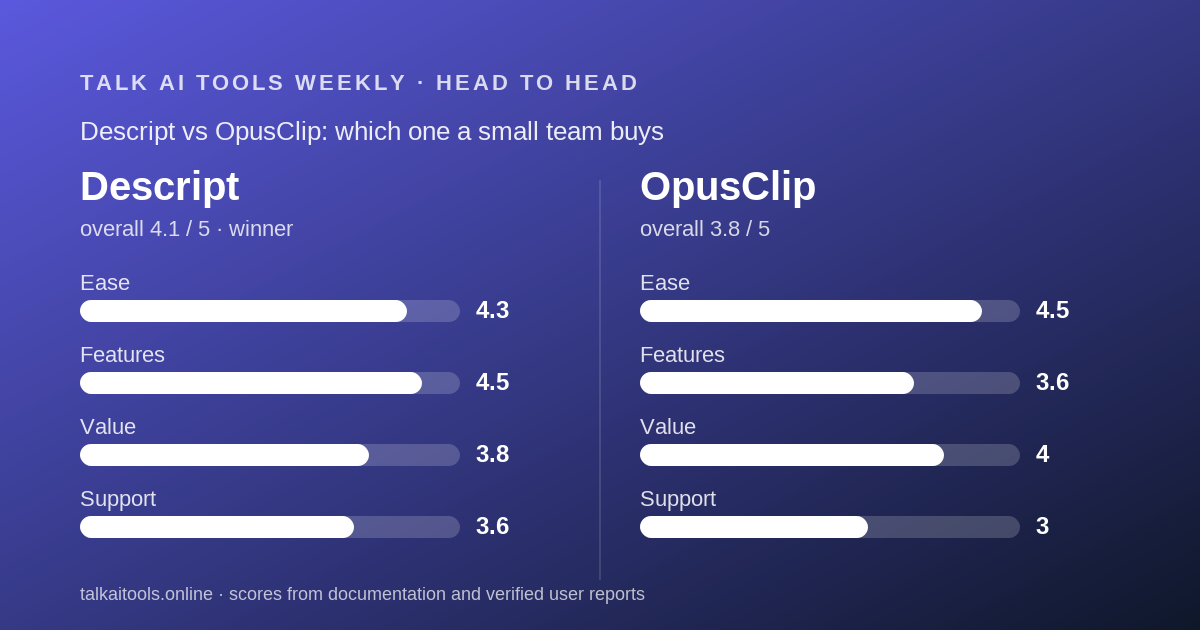
 4.1Descript
 3.8OpusClip
Specification by specification
| Spec | Descript | OpusClip |
|---|---|---|
| Entry paid price | $16 a seat a month billed annually, $24 monthly | $15 a month on Starter, monthly billing only |
| Annual discount on the entry plan | Yes, listed as saving up to 35 percent | No. Starter is monthly only; Pro is $174 a year |
| Free plan | $0 with 60 media minutes a month and 100 one-time AI credits | $0 with 60 credits a month, watermarked, exports expire after 3 days |
| Unit of the meter | Media minutes plus AI credits, both per editor | One credit equals one minute of video processing |
| Entry paid allowance | 600 media minutes and 400 AI credits a month | 150 credits, which is 150 minutes of source footage |
| Unused allowance | No rollover stated; top-ups sold on Creator and Business | Rolls over for two months on Pro, per the plan card |
| Seat ceiling on paid plans | 1 on Hobbyist, 3 on Creator, 5 on Business | None listed on Starter; 2 per pack up to 4 users on Pro |
| Export resolution | 1080p on Hobbyist, 4K from Creator upwards | Up to 1080p on Free; watermark removal from Starter |
| Long-form editing | Yes. The transcript-based editor is the product | Clip-level editing on paid plans, not long-form assembly |
| Scheduling and posting | Not listed on the pricing page | Scheduler plus posting to YouTube Shorts, TikTok and Instagram Reels |
| Translation | Captions in 61 languages, dubbing in 30, with a proofread step | Captions in 20 or more languages; dubbing listed without a language count |
| Support channels | Knowledge base, email, in-app chat Mon to Fri 5am to 5pm Pacific; SLA on Business | Discord and AI chat; custom onboarding and an MSA on Business |
| Security statements | SOC 2 Type II, AES-256 at rest, TLS 1.2 in transit, AI features opt-in | SOC II Type 2; SSO and licence management on Business |
| Trustpilot, October 26, 2026 | 2.6 out of 5 from 291 reviews | 4.0 out of 5 from 509 reviews |
OpusClip is cheaper to forecast; Descript does more jobs
Start with what each tool is for, because the prices only make sense after that.
Descript imports a recording, transcribes it, and lets you cut the video by deleting words. Around that sit audio cleanup, avatars, voice clones, dubbing and translated captions.
OpusClip imports a long recording and returns vertical clips with animated captions, a suggested virality score, and the means to schedule and post them.
One replaces an editor. The other replaces an editing task. A team that needs both will end up paying for both, which is worth knowing before either trial starts.
- OpusClip is best for a backlog of long video that needs to become a steady stream of shorts
- Descript is best for a team that films and publishes finished video and has nobody who edits timelines
Pricing: OpusClip wins at one seat, Descript wins past three
At one person the gap is small and OpusClip is slightly cheaper. Figures below are from both pricing pages, checked October 26, 2026.
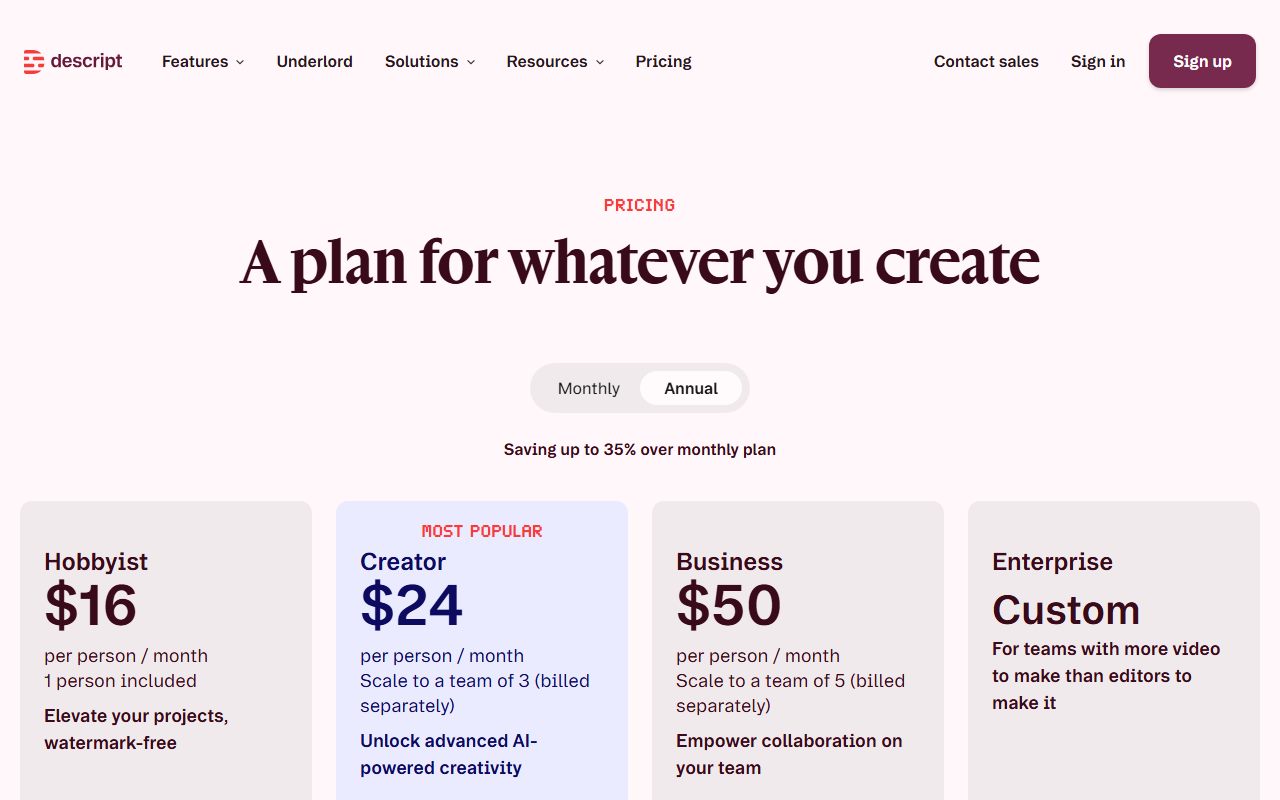
OpusClip Starter is $15 a month for 150 credits. Descript Hobbyist is $16 a seat a month billed annually, or $24 billed monthly, for 600 media minutes and 400 AI credits.
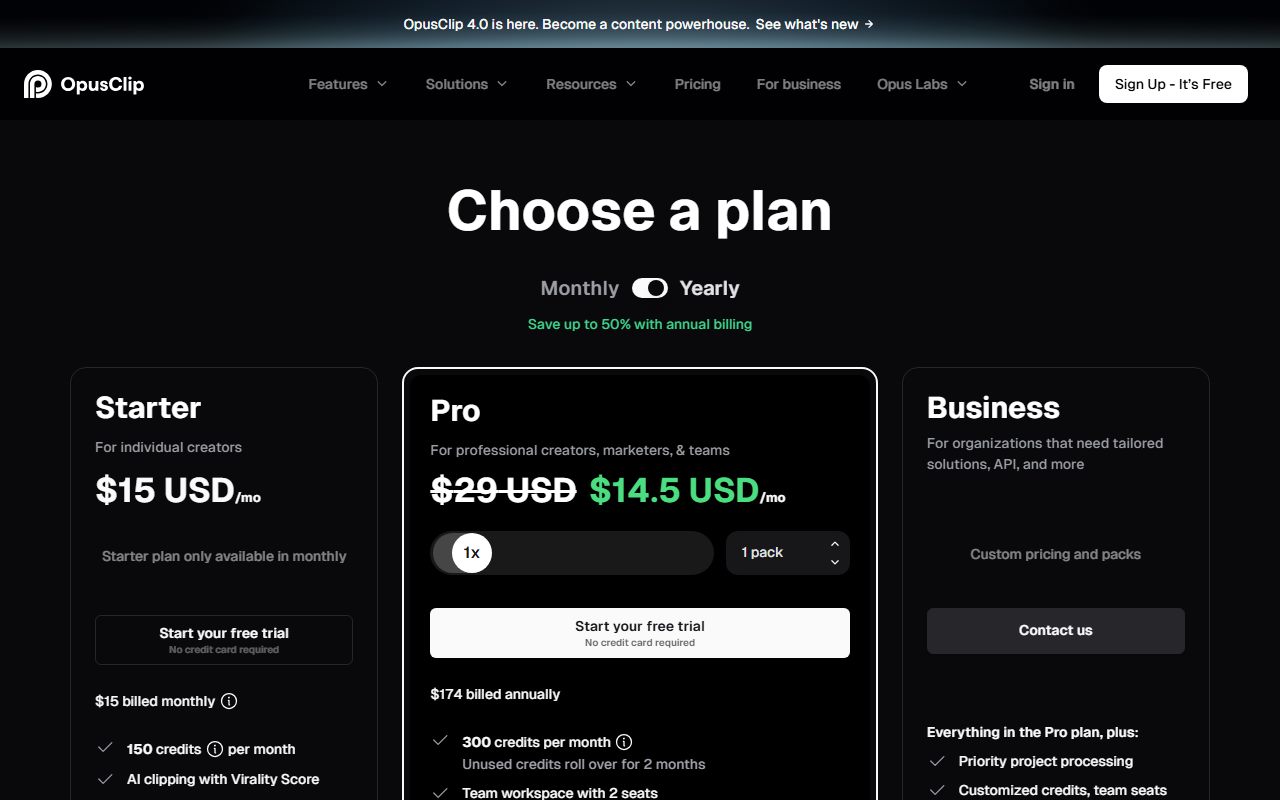
The annual picture favours Descript's structure. Hobbyist can be discounted; Starter carries a note on its card stating it is only available monthly.
At three people the tools diverge properly. Descript Creator is $24 a seat a month billed annually and scales to three seats, which is $72 a month by our arithmetic.
OpusClip Pro is $29 a month, or $174 billed annually, which is $14.50 a month by our arithmetic. Pro includes two seats and scales to four through credit packs whose price is not printed on the page.
So a three-person team pays roughly $72 a month for Descript and an unpublished figure for OpusClip. That is a real difference in buying confidence, not just in price.
Metering: one countable unit against two abstract ones
OpusClip wins this outright, and it is the most useful difference between the two.
A tooltip on the OpusClip pricing page defines one credit as one minute of video processing. Count the minutes of footage you want cut, and you have your plan.
Descript runs two meters. Media minutes track imported or recorded material. AI credits track usage of AI features such as Underlord, Studio Sound, Green Screen and generated media.
Both of Descript's meters are per editor, and the page does not convert credits into minutes of any specific feature. A buyer cannot tell whether 400 credits covers a month until a month has gone by.
This is the pattern we have been tracking across small-team software all year, where a seat price carries a usage meter beside it. The spotlight on AI credit meters and the week Copilot split the bill both describe the same move.
One honest caveat for OpusClip: credit packs are the mechanism for growing past the plan, and the pack price is absent from the page.
Editing: Descript replaces an editor, OpusClip refines a clip
Descript wins this by design rather than by execution, and the plan pages make the gap obvious.
Descript's core interaction is the whole value proposition. Deleting a sentence removes the footage. Removing filler words, shortening gaps and cutting bad takes are all single commands on the transcript.
OpusClip does have an editor on its paid tiers, with text and timeline-based editing, B-roll, voice-over, speech cleanup and transitions. Those exist to improve a clip the engine produced.
Nothing in the OpusClip comparison table suggests assembling an original long-form video from several sources, and the vendor does not market it that way.
The practical test is simple. If your raw material is not yet a finished video, Descript is the tool. If it is already finished and only needs slicing, OpusClip is.
Publishing: OpusClip ships the clips, Descript hands you a file
OpusClip wins the last mile, and for some teams that decides the whole question.
The OpusClip paid plans list a social media scheduler, posting to multiple profiles per platform, direct publishing to YouTube Shorts, TikTok and Instagram Reels, and a title, description and hashtag generator.
Six social account connections are listed on Pro. Clip analytics and real-time trend analysis appear on the higher columns.
Descript's pricing page lists no scheduling or publishing features at all. It is an editor, and the output is a file.
That is not a flaw if you already pay for a scheduler. Buffer and Metricool both cover that step with far more calendar control than a clipping tool offers.
It is a real cost if you do not. A team buying Descript alone needs a second subscription to get the clips out.
Languages: Descript publishes the counts, OpusClip publishes fewer
Descript wins on published detail, which is the only thing either of us can grade from documentation.
Descript lists transcription in 25 languages on every tier including Free, caption translation in 61 languages, and audio dubbing in 30 languages, each with the list of languages printed in full.
It also lists a translation proofreading step in the editor and native-sounding AI speakers in 14 named languages.
OpusClip lists AI animated captions in 20 or more languages and multi-language transcription across all tiers. Video dubbing appears as a paid feature on the comparison table without a language count beside it.
We are grading the pages, not the models. A vendor that prints the full language list has made a checkable promise, which is worth more than a larger number without one.
Support: Descript lists hours, OpusClip lists Discord
Descript wins on published channels; OpusClip wins on observable behaviour. Neither has been measured by us.
Descript's comparison table lists a knowledge base, email support and in-app live chat, with the chat tooltip stating hours of Monday to Friday, 5:00 a.m. to 5:00 p.m. Pacific Time. Priority support with an SLA appears on the Business card.
OpusClip's customer support row lists Discord and AI chat for the self-serve plans, with custom onboarding and a master service agreement on Business.
For a paying small business, a community server and a bot are thin. That is the single weakest line on the OpusClip sheet.
Against that, Trustpilot's company panel records OpusClip replying to 100 percent of negative reviews within about 24 hours. Descript is recorded at 3 percent, typically within a week.
So the vendor with the worse published channels answers public complaints far more often. Both facts are true and a buyer should weigh both.
What users report: the scores point the other way
OpusClip wins on public sentiment, and the collection method matters as much as the number.
On Trustpilot, read October 26, 2026, OpusClip holds 4.0 out of 5 across 509 reviews and Descript 2.6 out of 5 across 291.
Trustpilot's own panel records that OpusClip asks customers to review, whether positive or negative. Invited samples reliably run higher than uninvited ones.
The same panel records that Descript has no recent history of asking for reviews, and notes that its sample may therefore not be representative of the customer base.
So the gap is real but it is not a clean quality measurement. An uninvited sample of 291 is weighted towards people motivated to complain.
For scale, VEED sits at 4.2 from 3,915 reviews on the same date, which is the only sample here large enough to be stable. We are reporting scores and their methods, not causes.
Free tiers: both give you an hour, with different strings
This one is close, and the strings attached matter more than the allowances.
Both free plans land on the same number by coincidence. Descript gives 60 media minutes a month. OpusClip gives 60 credits a month, which is 60 minutes of footage at its own definition.
Descript's free tier keeps transcription in 25 languages and unlimited projects, and its pricing FAQ states no credit card is required. AI credits on Free are 100 as a one-off rather than a monthly refill.
OpusClip's free tier keeps the clipping engine, auto reframe and AI captions, but adds a watermark and states that clips stop being exportable after three days.
That export window is the harsher limit. It is enough to judge clip quality and not enough to build anything you keep.
Descript's limit is subtler. One hour of footage a month shows the workflow, and the one-off credit grant means the AI features stop working at exactly the point you start relying on them.
Neither free tier is a production plan. Both are honest about being a demonstration, which is more than many vendors in this category manage.
Data and AI terms: Descript publishes more, OpusClip publishes less
Descript wins this clearly, and for anyone handling client footage it should carry weight.
Descript's security page states SOC 2 Type II compliance, GDPR, CCPA and the Privacy by Design framework, with AES-256 encryption at rest and TLS 1.2 in transit.
The sentence that matters most is this: all AI features are opt-in and AI voices require user consent. It also states Descript does not collect information from user systems automatically, and that project information is confidential even from Descript.
Enterprise adds custom AI controls and custom retention, including the option to opt out of training.
OpusClip's comparison table lists SOC II Type 2 compliance, email one-time-password login on the self-serve plans, and single sign-on plus software licence management on Business.
What we did not find on the OpusClip pricing page, read October 26, 2026, is any statement about whether uploaded footage is used to train models. Descript addresses that question on its security page and OpusClip does not address it on the page we read.
Media retention is the other published difference. OpusClip states storage expires after three days on Free and 29 days on paid plans, so it is a workbench rather than an archive.
Choose Descript if, choose OpusClip if
The decision comes down to whether your raw material is already a finished video.
- Choose Descript if you need to build and cut long-form video and nobody on the team edits timelines
- Choose Descript if you want translated captions or dubbing with the language lists published
- Choose Descript if you want an annual discount on the cheapest paid plan and a support channel with hours
- Choose OpusClip if you have long recordings already and only need vertical clips from them
- Choose OpusClip if you want the bill countable in minutes of footage before you commit
- Choose OpusClip if you need scheduling and posting bundled rather than a second subscription
Bottom line
On our four-column rubric Descript scores 4.05 of 5 and OpusClip 3.78, and the margin sits almost entirely in breadth.
Descript is the pick for a team whose problem is making video at all. It removes the skill barrier more completely than any single AI feature on either page, and its published detail on languages, support hours and security is the better of the two.
OpusClip is the pick for a team whose problem is distribution. One credit equals one minute is the clearest unit in this category, and bundled scheduling saves a line on the invoice.
A third option is worth a look if you want generation as well as editing on one seat: VEED lists Creator at $116 a year per user with 6,000 credits.
If the real need is only the words from a recording, neither tool is the cheap answer. Our shortlist of AI meeting note takers, Otter.ai and Fathom cover that job for less.
Full detail sits in the Descript review and the OpusClip review. Every figure above was read on the vendors' own pages on October 26, 2026.
Frequently asked
Is Descript or OpusClip cheaper for one person?
OpusClip Starter is listed at $15 a month against Descript Hobbyist at $16 a seat a month billed annually, checked October 26, 2026. Starter has no annual option, so over a year Descript's $16 rate is the one that can be discounted.
Which is cheaper for a three-person team?
Descript Creator is $24 a seat a month billed annually and scales to three seats, which is $72 a month by our arithmetic. OpusClip Pro covers two seats and reaches four through credit packs whose price is not printed on its pricing page.
Can OpusClip replace a video editor?
Not for long-form work. Its comparison table lists clip-level editing, B-roll, voice-over and transitions on paid plans, but nothing describing assembly of an original long video from several sources.
Does Descript post clips to social media?
Its pricing page lists no scheduling or publishing features as of October 26, 2026. OpusClip includes a scheduler and direct posting to YouTube Shorts, TikTok and Instagram Reels on its paid plans.
Can you use both tools together?
Yes, and some teams will. Descript would cut and finish the long video, OpusClip would slice and publish the shorts. Priced at the entry tiers that is about $31 a month by our arithmetic, before any annual discount.
Visit Descript
We have no affiliate relationship with this vendor. Link goes to the official site.
Visit OpusClip
We have no affiliate relationship with this vendor. Link goes to the official site.