 Talk AI Tools

Descript
Edits video by editing the transcript, and bills on two separate meters per editor
Scored on the published rubric, from documentation, pricing and verified user reports.
Best for: A small team that records a lot of talking and wants to cut video the way it edits a document.
Verdict
Descript is the most complete tool in this cluster and the hardest to size correctly. This is a documentation review, built from the vendor's pricing page, its security page and the structured FAQ published on the pricing page, all read on October 26, 2026. No account was opened and no first-hand claims appear below.
The product edits video by editing a transcript, which remains the clearest idea in this category. Billing runs on two meters: media minutes and AI credits, both counted per editor per month.
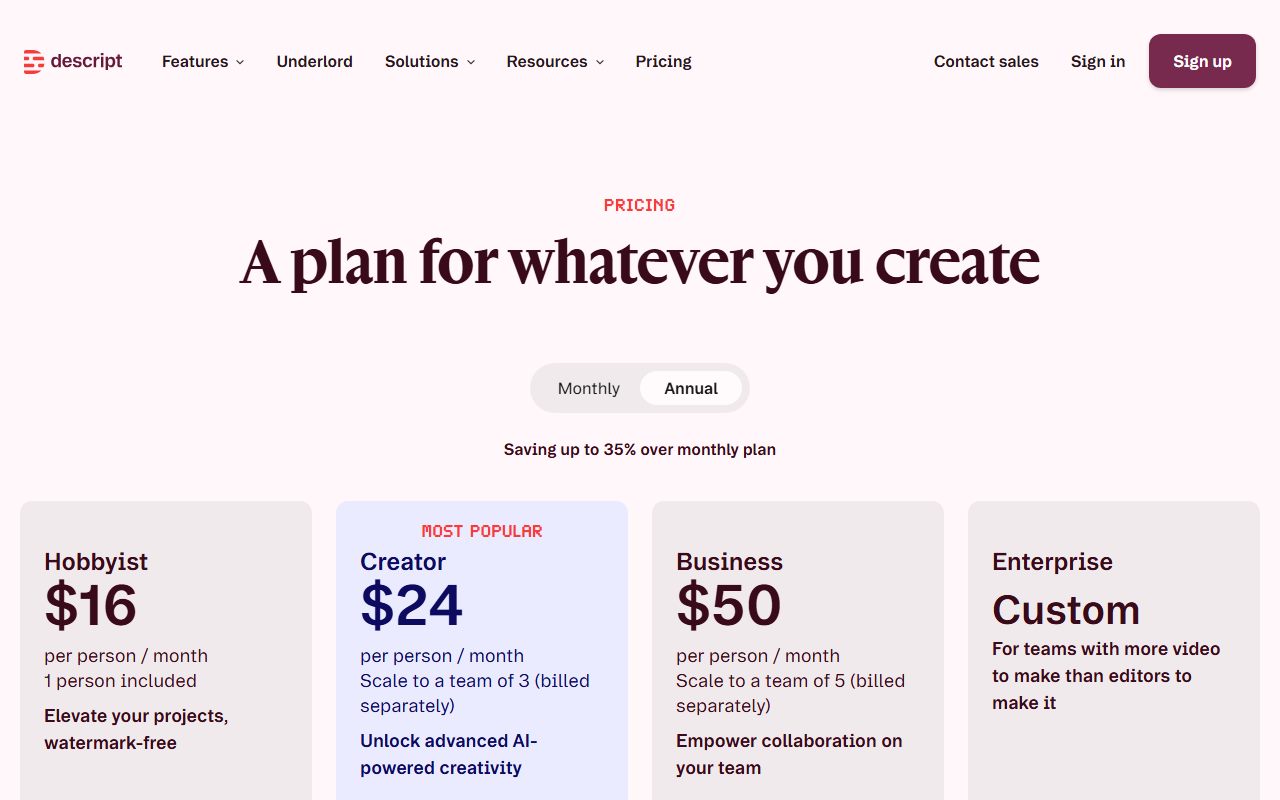
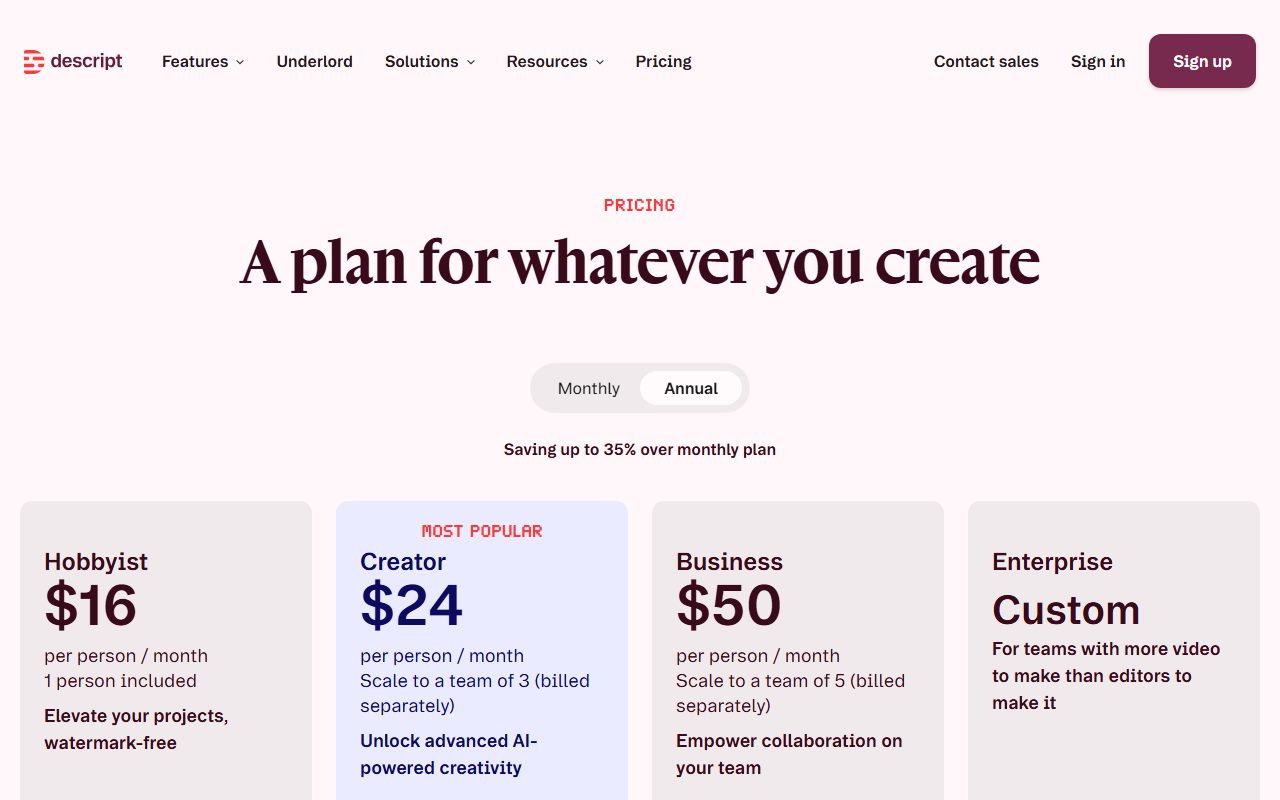
Hobbyist is listed at $16 a seat a month billed annually, or $24 billed monthly, and carries 600 media minutes and 400 AI credits. Creator and Business raise both meters and cap team size at 3 and 5 seats.
Support is better than the price suggests. In-app live chat has published hours, and the Business card lists priority support with an SLA. The weak column is public sentiment, where Trustpilot shows 2.6 out of 5.
Visit Descript
We have no affiliate relationship with this vendor. Link goes to the official site.
Where it is strong
- Text-based editing means anyone who can edit a document can cut a video, with no timeline skills required
- The free plan needs no credit card, per the vendor's own pricing FAQ, and includes 60 media minutes a month
- In-app live chat support carries published hours: Monday to Friday, 5:00 a.m. to 5:00 p.m. Pacific Time
- The security page states all AI features are opt-in and AI voices require user consent
- Annual billing is listed as saving up to 35 percent against monthly, and the figures on the page bear that out
Where it falls short
- Two meters per editor, media minutes and AI credits, make the monthly bill hard to predict before you start
- Seats on Creator and Business are capped at 3 and 5 and billed separately, so team growth means a plan change
- Trustpilot shows 2.6 out of 5 across 291 reviews as of October 26, 2026, the weakest score in this cluster
- The vendor has replied to 3 percent of negative Trustpilot reviews, per that site's own company panel
- 4K export sits on Creator and above, so the cheapest paid plan is capped at 1080p
At a glance
| Starting price | $0 Free; Hobbyist $16/seat/mo billed annually or $24 billed monthly (pricing page, October 26, 2026) |
|---|---|
| Pricing note | From $16 a seat a month billed annually, or $24 billed monthly, on the Hobbyist plan (pricing page, checked October 26, 2026) |
| Free plan | Yes - 60 media minutes a month and 100 one-time AI credits |
| Seat minimum | 1 on Hobbyist; Creator scales to 3 seats and Business to 5, each billed separately |
| Media allowance | 600 minutes Hobbyist, 1,800 Creator, 2,400 Business, per editor per month |
| AI credits | 100 one-time on Free, then 400, 800 and 1,500 a month per editor |
| Support channels | Knowledge base and email; in-app live chat Monday to Friday 5:00 a.m. to 5:00 p.m. Pacific; priority support with an SLA on Business |
| Security | SOC 2 Type II, GDPR and CCPA; AES-256 at rest and TLS 1.2 in transit, per the security page |
What Descript actually is
Descript is a transcript that happens to be a video editor, and that single idea explains both the appeal and the pricing.
You import a recording. The tool transcribes it. You delete a sentence in the text and the matching frames leave the timeline. Filler words can be removed the way a word processor removes a word.
Around that core sit the AI tools the plan cards advertise: Studio Sound for audio cleanup, Green Screen, Eye Contact, Remove Retakes, avatars, voice clones, dubbing and an assistant the vendor calls Underlord.
Every one of those draws on the second meter. The pricing FAQ says it plainly: AI credits track usage of AI features, while media hours track the material you bring in.
So the product is one editor with two taps running into it. Our shortlist of AI video editing tools for a small team ranks it on that basis.
Who Descript is best for
The fit is a team that already records talking and loses its week in the cutting.
- A podcast or interview show where the edit is mostly removing bad takes, pauses and digressions
- A marketing team that films webinars and wants a written-looking workflow instead of a timeline
- A founder recording product walkthroughs who needs captions and a clean audio track, not motion graphics
- A team of up to five editors, which is the seat ceiling on the Business plan as listed
- Anyone who needs dubbing or translated captions inside the same tool rather than a second subscription
- A buyer who wants to test on real footage first, since the free plan needs no card per the vendor FAQ
Who should skip it
Two kinds of buyer will overpay here.
- Anyone whose only job is slicing one long video into vertical shorts, where a narrower clipping tool costs less
- Anyone who needs more than five editors on one plan, because seats are capped at three and five on the paid tiers
- Anyone who needs transcription alone, where a meeting-focused tool like Otter.ai or Fathom is the cheaper path
What the free plan includes as of October 2026
The free tier is a trial of the idea rather than a working production plan, and the numbers say why.
Per the plan comparison read on October 26, 2026, Free carries 60 media minutes a month, which is one hour of material. AI credits on Free are listed as 100 one-time, not a monthly refill.
Exports on Free carry a watermark. Transcription is still included, in 25 languages, and projects are unlimited, so you can see the text-editing workflow properly before paying.
The vendor's own pricing FAQ answers the credit card question directly: no card is needed, and the Free plan includes what you need to record, edit and mix audio and video content.
That is a fair trial design. One hour of footage is enough to decide whether editing by transcript suits the way your team works.
How the pricing is structured
There are four published tiers plus Enterprise, and the per-seat figure is only half the price. Figures below come from the pricing page, checked October 26, 2026.
Free is $0. Hobbyist shows $16 a seat a month on the annual toggle and $24 on monthly, with 1 person included, 600 media minutes and 400 AI credits.
Creator shows $24 annually and $35 monthly, scales to a team of 3 billed separately, and carries 1,800 media minutes and 800 AI credits. It is the first tier with 4K export.
Business shows $50 annually and $65 monthly, scales to 5 seats, and carries 2,400 media minutes and 1,500 AI credits. Enterprise is quoted on request.
The page states savings of up to 35 percent on annual billing. By our arithmetic the Hobbyist gap is 33 percent and the Business gap 23 percent, so 35 percent is a ceiling rather than a typical figure.
Both meters are per editor. That matters more than the seat price when three people each import several hours a month. The same seat-plus-usage split is spreading across small-team software, as the week Copilot split the bill showed.
Ease of use: what the score is built from
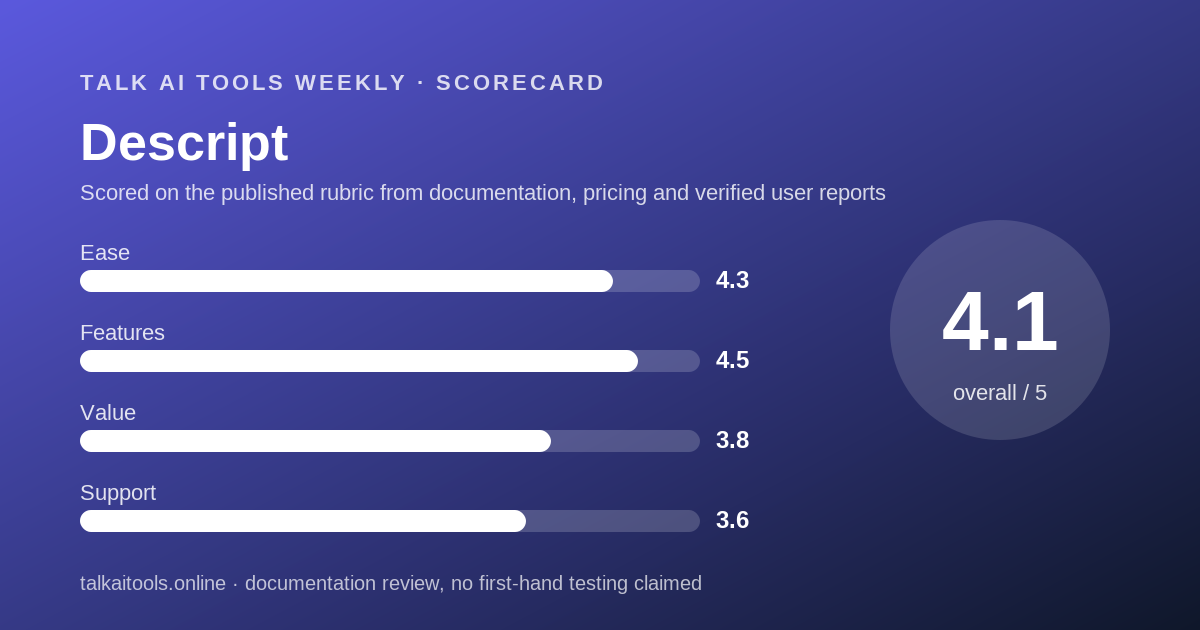
Ease scores 4.3 of 5, and the rubric points come from workflow clarity, published limits and how little the tool asks a beginner to learn.
The core interaction is the strongest argument. Deleting text to delete footage removes the entire mental model of tracks, keyframes and ripple edits.
The pricing page is also unusually legible. Media minutes, AI credits, seat ceilings, export resolution and support channels are all printed in a comparison table rather than hidden behind a sales call.
We deduct for the metering. Knowing whether 800 AI credits covers your month requires running a month first, because the page does not convert credits into minutes of any specific feature.
That is the same problem readers hit when vendors meter security scanning, which we wrote about in the spotlight on AI credit meters.
Features: the two meters decide what you can do
Features score 4.5 of 5, the highest column on this card, because the paid plans cover more jobs than a video editor normally does.
Transcription is listed in 25 languages across every tier, including Free. Caption translation is listed in 61 languages and audio dubbing in 30, both on paid plans with a proofreading step in the editor.
Avatars are included rather than sold separately: the comparison lists a gallery of over 35 avatars, text-prompt avatars, image stylisation and custom avatars from an uploaded photo on the higher tiers.
Recording is built in too. Room recording hours are listed per drive, from 2 hours on Free up to 25 hours a month, with a 10-participant ceiling on every tier.
The limit is breadth of control, not breadth of feature. This is not a motion graphics tool, and the page does not claim to be one.
If your real need is cleaning up meeting audio rather than publishing, Krisp solves a narrower problem for less.
Value: the per-editor meter is the real price
Value scores 3.8 of 5, graded on what the published price buys at one, three and five editors.
At one editor, Hobbyist at $16 a month billed annually for 600 media minutes and 400 AI credits is reasonable for a weekly show. The 1080p cap is the thing to check first.
At three editors, Creator is the designed answer: $24 a seat a month annually, which is $72 a month by our arithmetic, with 1,800 media minutes each.
At five editors, Business at $50 a seat annually is $250 a month by our arithmetic. That is a real budget line, and it buys 2,400 minutes and 1,500 credits per person.
The awkward case is a team where one person imports everything. Allowances are per editor and the page does not describe pooling, so an uneven team pays for capacity it cannot move.
Top-ups for both media minutes and AI credits are listed on Creator and Business, which softens the ceiling but adds a third line to the invoice.
Support: published chat hours, and an SLA only on Business
Support scores 3.6 of 5, graded on published channels and stated hours rather than any response time of our own.
The comparison table lists four support rows: a self-serve knowledge base, email support, in-app live chat, and priority support with an SLA.
The live chat row carries real detail, which is rarer than it should be. The tooltip states chat with the support team is available Monday through Friday, 5:00 a.m. to 5:00 p.m. Pacific Time.
Priority support with guaranteed response times appears on the Business plan card at $50 a seat a month billed annually. No numeric response target is published for the lower tiers.
We did not measure response times and will not estimate them. The score reflects a clear channel list with hours attached, which beats most vendors in this category.
What verified users report
Public sentiment is the weakest part of the case, and the context around the score matters as much as the number.
On Trustpilot, read October 26, 2026, Descript holds 2.6 out of 5 across 291 reviews. For comparison on the same date, OpusClip sits at 4.0 from 509 reviews and VEED at 4.2 from 3,915.
Trustpilot's own company panel adds two caveats. It notes Descript has no recent history of asking for reviews, so the sample may not be representative of the customer base.
It also records that the company has replied to 3 percent of negative reviews and typically replies within a week. OpusClip, by contrast, is recorded as replying to 100 percent of negative reviews within 24 hours.
That gap cuts both ways. Invited reviews lift an average, and uninvited ones skew towards people with a complaint, so neither figure is a clean read on product quality.
We are reporting a score and its collection method, not a cause. The vendor also states on its pricing page that more than 6 million creators and teams use the product.
Limits and data handling stated by the vendor
Descript publishes more detail on security than most tools at this price, and the AI language is the useful part.
The security page states the company is SOC 2 Type II compliant and follows GDPR, CCPA and the Privacy by Design framework. Data is encrypted with AES-256 at rest and HTTPS using TLS 1.2 in transit.
On AI specifically, the page states all AI features are opt-in and AI voices require user consent, that users control what data they provide, and that Descript does not collect information from user systems automatically.
The pricing FAQ adds that project information is confidential, even from Descript, and that an account can be deleted to wipe data from the servers.
Enterprise adds custom AI controls, custom retention and the option to opt out of training, per the Enterprise column on the pricing page.
What we did not find on either page, read October 26, 2026, is a plain statement covering whether paid-plan content on the self-serve tiers is excluded from model training by default. That is a fair question to put to the vendor before uploading client footage.
Alternatives worth reading before you decide
Three alternatives cover most reasons a reader would reject Descript.
Choose OpusClip if the job is turning one long recording into vertical shorts and nothing else. Its Starter plan is listed at $15 a month for 150 credits, where one credit equals one minute of video processing.
Choose VEED if you want generative video and voice inside the same seat and you are willing to commit annually. Its Creator plan is listed at $116 a year per user with 6,000 credits.
Choose a meeting tool if you only want the words. Our shortlist of AI meeting note takers and the Otter.ai against Fathom comparison cover that job at a lower price.
Otherwise choose Descript if your team publishes finished video every week, nobody wants to learn a timeline, and you can live with two meters on the invoice.
Whatever you cut, something has to publish it. Buffer and Metricool are the two scheduling tools we have graded for that step.
Bottom line
Descript earns 4.05 of 5 on our four-column rubric and is the broadest tool we have graded in this category.
It is the right pick when a small team publishes talking video regularly and the real constraint is editing skill. Editing by transcript removes that constraint more completely than any AI feature on the page.
It is the wrong pick when you need one predictable number, more than five editors, or nothing more than clips.
Before buying, count the hours of footage one person actually imports in a month and compare that against the 600, 1,800 and 2,400 minute allowances. The seat price is the smaller question.
The seat-plus-usage pattern is not unique to video, and the price of the underlying models keeps moving, as the Haiku pricing reset showed.
Every figure above was read on the vendor's own pages on October 26, 2026. Prices and allowances in this category move often, so check the date before trusting the number.
Buy it if
- You publish long-form talking video or audio every week and the bottleneck is cutting, not filming
- Nobody on the team is a timeline editor and you want the editing skill to be reading and deleting text
- You need dubbing or translated captions in the same tool, because both are listed inside the paid plans
- You want a free tier with no card, which the vendor states plainly in its pricing FAQ
Skip it if
- Your only job is turning one long video into short clips, which a narrower tool prices lower
- You need more than five editors on one invoice, because paid plans cap seats at three and five
- You need a fixed monthly figure, because media minutes and AI credits are counted separately per editor
Frequently asked
Does Descript have a free plan?
Yes. The pricing page, checked October 26, 2026, lists a $0 plan with 60 media minutes a month and 100 one-time AI credits. The vendor's own FAQ on that page states no credit card is needed to try it.
What are media minutes and AI credits?
The vendor's FAQ defines media hours as uploaded or recorded media processed in Descript, transcribed or not. AI credits track usage of AI features such as Underlord, Studio Sound, Green Screen, Eye Contact and generated media.
How much does Descript cost for a three-person team?
The Creator plan is listed at $24 a seat a month billed annually, or $35 billed monthly, and scales to a team of three billed separately. By our arithmetic that is $72 a month annually billed, or $105 monthly.
Can you export 4K on the cheapest paid plan?
No. The plan cards read on October 26, 2026 put watermark-free 1080p export on Hobbyist and 4K export on Creator. Creator is listed at $24 a seat a month billed annually against Hobbyist at $16.
Does Descript use your video to train AI?
The security page states all AI features are opt-in and AI voices require user consent, and that Descript does not collect information from user systems automatically. Enterprise plans add custom AI controls and custom retention.
What support does Descript provide?
The pricing comparison lists a self-serve knowledge base, email support and in-app live chat available Monday to Friday, 5:00 a.m. to 5:00 p.m. Pacific Time. Priority support with an SLA appears on the Business plan card.
Sources
- Descript pricing page and plan comparison - checked October 26, 2026
- Descript security and privacy page - checked October 26, 2026
- Descript reviews on Trustpilot - checked October 26, 2026
Update history
- October 26, 2026 - First publication. Plan prices, media minute and AI credit allowances, support rows and security claims read from the vendor's pricing and security pages on this date. Trustpilot score and company panel notes read the same day.
Visit Descript
We have no affiliate relationship with this vendor. Link goes to the official site.