 Talk AI Tools

Otter.ai
A minutes-metered meeting notetaker with the broadest device coverage, priced for teams that know their monthly call volume
Scored on the published rubric, from documentation, pricing and verified user reports.
Best for: Small teams that meet on Zoom, Teams and Google Meet, record in person on a phone, and can live inside a monthly minute allowance.
Verdict
Otter.ai is the most widely known AI meeting notetaker, and this documentation review finds it still earns that position on reach: a Mac and Windows desktop app that records without a bot, iOS and Android apps, a Chrome extension, and native joins for Zoom, Microsoft Teams and Google Meet, all listed on the vendor's homepage as of October 2026. The catch is the meter. The free Basic plan allows 300 transcription minutes a month and 30 minutes per conversation; Pro raises that to 1,200 and 90; only Business, at $19.99 per user per month billed annually, removes the cap. Per the pricing page checked October 10, 2026, Pro lists at $8.33 per user per month on annual billing and $16.99 monthly, which is competitive, but a team that runs long calls will outgrow it quickly. Otter also states on its security page that it trains its own models on de-identified user data, a point privacy-sensitive buyers should weigh. We did not run Otter ourselves; the grades below come from the pricing page, the privacy and security page, the homepage and 732 Trustpilot reviews, all read on October 10, 2026.
Visit Otter.ai
We have no affiliate relationship with this vendor. Link goes to the official site.
Where it is strong
- Free Basic plan with 300 minutes a month and no credit card, per the pricing page checked October 10, 2026
- Desktop app records without a bot on Mac and Windows; mobile apps cover in-person meetings
- Pro annual price of $8.33 per user per month undercuts most rivals' entry tiers
- Salesforce, HubSpot and Zapier integrations start at Pro, not at a business tier
- SOC 2 Type 2 report and AES-256 encryption at rest stated on the vendor's security page
Where it falls short
- Minute caps on Basic (300/mo) and Pro (1,200/mo), with a 90-minute per-conversation ceiling on Pro
- The vendor states it trains its own models on de-identified user data
- Trustpilot shows 29 percent one-star reviews, mostly about limits and unexpected charges
- SSO and SCIM require a minimum 100-user licence; HIPAA is a paid add-on
- Language support is described only as 'multiple languages' with no published count
At a glance
| Starting price | $8.33/user/mo billed annually; $16.99 monthly (Pro) |
|---|---|
| Pricing note | From $8.33/user/mo billed annually, $16.99 monthly (pricing page, checked October 10, 2026) |
| Free plan | Basic: 300 min/mo, 30 min per conversation, up to 5 workspace members |
| Unlimited tier | Business: $19.99/user/mo annual, $30 monthly |
| Platforms | Zoom, Microsoft Teams, Google Meet, Mac/Windows app, iOS, Android, Chrome extension |
| Compliance | SOC 2 Type 2 report; HIPAA as paid add-on; GDPR practices stated |
| Data location | AWS S3; region not published |
| Trial | No timed trial; free Basic plan instead |
What Otter.ai actually is
Otter.ai is a transcription service that grew into what the vendor now calls a meeting agent. The core loop is unchanged: audio goes in, a speaker-labelled transcript comes out, and an AI layer writes summaries, action items and answers questions across past meetings.
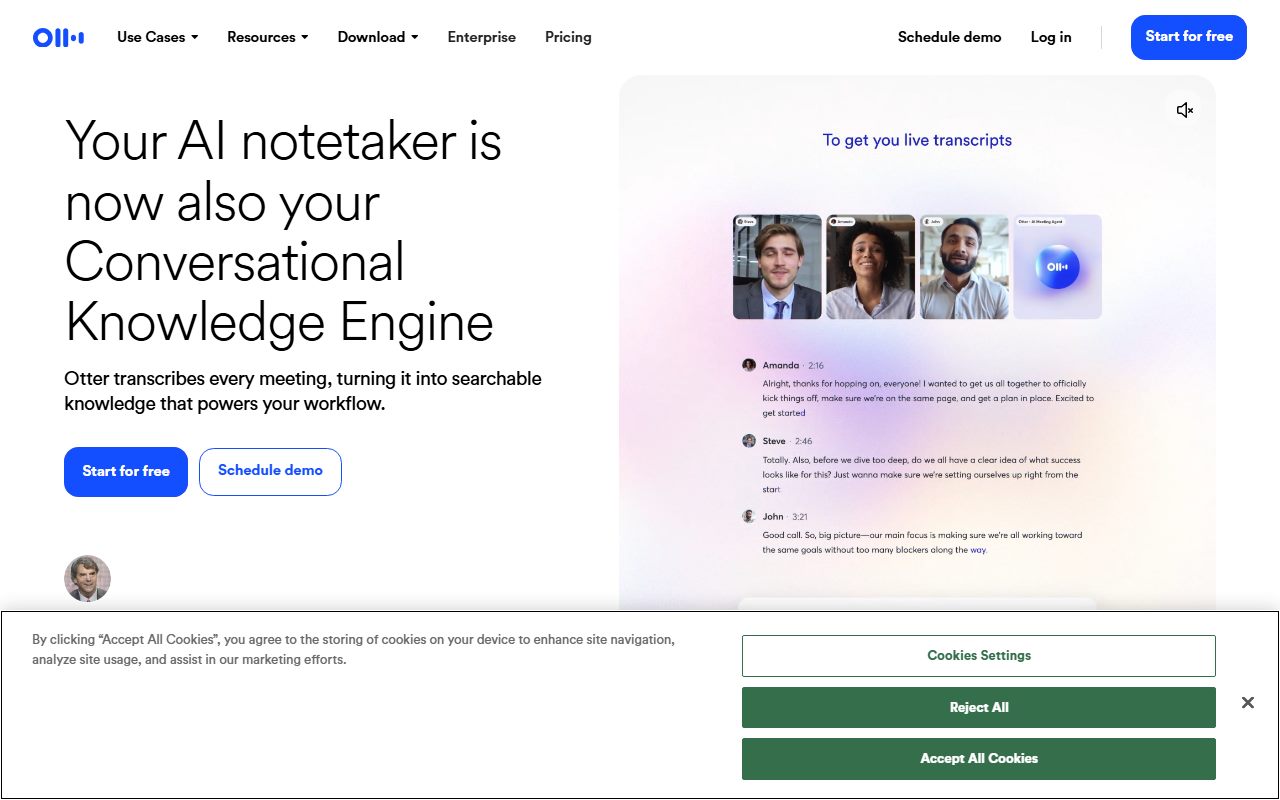
What has changed is the number of doors into that loop. As of October 10, 2026 the homepage lists a desktop app for Mac and Windows that records without a bot, iOS and Android apps, a Chrome extension, and calendar-driven joins for Zoom, Microsoft Teams and Google Meet.
Around the transcript sit named agents for sales, education, media, recruiting and SDR work, an MCP server for connecting meeting data to chat tools, and Channels for grouping meetings by team. None of these change the pricing model, which is still a per-user seat with a monthly minute allowance.
That allowance is the single most important thing to understand before buying, and the rest of this review keeps returning to it. For the wider picture of how Otter compares with bot-free and privacy-first rivals, see our guide to the best AI meeting note takers for small teams.
Who Otter.ai is best for
Otter suits teams whose meetings happen in many places rather than many hours. The device coverage is the strength; the minute meter is the constraint.
- Consultants and founders who record client calls on Zoom one hour and a coffee-shop conversation on a phone the next
- Sales teams on Pro that want transcripts pushed into Salesforce or HubSpot without a business-tier bill
- Recruiters running back-to-back 30 to 45 minute screens that fit comfortably inside the 90-minute Pro ceiling
- Students and teachers, who get Pro annual at $6.67 a month with a .edu address, per the pricing page
- Teams of up to five that want a shared free workspace before committing to anything
- Anyone who wants the largest help centre and the longest track record in the category
Who should skip it
Three groups should look elsewhere first.
- Teams that routinely run two-hour workshops: Pro caps a single conversation at 90 minutes, and only Business lifts that to four hours
- Organisations whose data policy excludes any vendor model training on customer content, even de-identified; Krisp states it never trains on customer data
- Small teams that need SSO: the pricing page ties SSO and SCIM to a minimum 100-user licence
What each plan includes (as of October 2026)
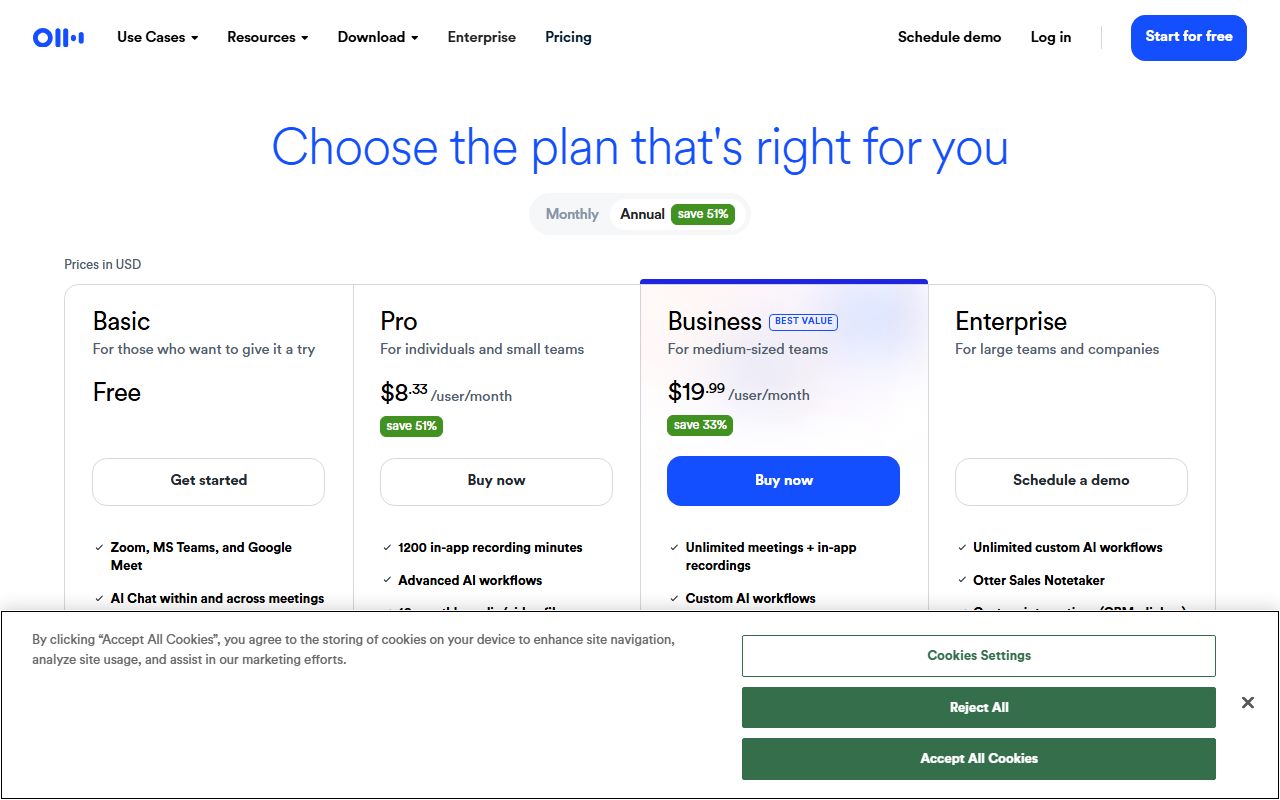
The pricing page, checked October 10, 2026, lists four plans.
Basic is free for ever. It includes 300 transcription minutes a month shared across live meetings and imports, a 30-minute cap per conversation, three lifetime file imports, one concurrent meeting, 20 AI Chat queries per user per month, five custom vocabulary terms and history for the 25 most recent conversations. Workspaces can hold up to five members.
Pro lifts the allowance to 1,200 minutes a month and 90 minutes per conversation, with 10 file imports a month, two concurrent meetings, 50 AI Chat queries, unlimited storage and history, and Salesforce, HubSpot and Zapier integrations. Export adds PDF, DOCX and SRT.
Business removes the monthly cap on meetings and in-app recordings, allows 6,000 imported minutes per user, raises the per-meeting ceiling to four hours, permits three concurrent meetings, and adds usage analytics, activity logs, bulk export, 200 AI Chat queries and prioritised support.
Enterprise adds SSO, SCIM, domain capture, the Otter API and webhooks, custom CRM and dialer integrations, the Sales Notetaker and video replay for Zoom and Google Meet. SSO and SCIM each carry a minimum 100-user licence. HIPAA compliance is listed as an add-on.
Limits do not roll over from month to month. The page also marks AI Chat with Gmail, Google Drive, Notion and Jira as new or coming soon, depending on the billing toggle, so treat that feature as in flux.
How the pricing is structured
Per the pricing page on October 10, 2026, Pro lists at $16.99 per user per month on monthly billing or $8.33 per user per month billed annually. Business lists at $30 monthly or $19.99 annual. Enterprise is by quote.
The page also shows asterisked promotional prices of $8.49 monthly and $4.17 annual for Pro marked 'save 50%', and a 20 percent discount on Business for the first three months for new subscribers. The page does not explain the asterisk, so the list prices above are the safer planning figures.
The Pro card carries the label '5 billed users' and the Business card '25 billed users'. The page does not say whether these are minimums or illustrative workspace sizes. Ask before assuming you can buy a single Business seat.
Editorial arithmetic for a 10-person team: Pro annual is about $1,000 a year; Business annual is about $2,399 a year. The jump buys unlimited minutes, four-hour meetings and analytics. Whether it is worth it depends entirely on call volume, which is why the Otter vs Fathom comparison spends so long on the meter.
Ease of use: what the score is built from
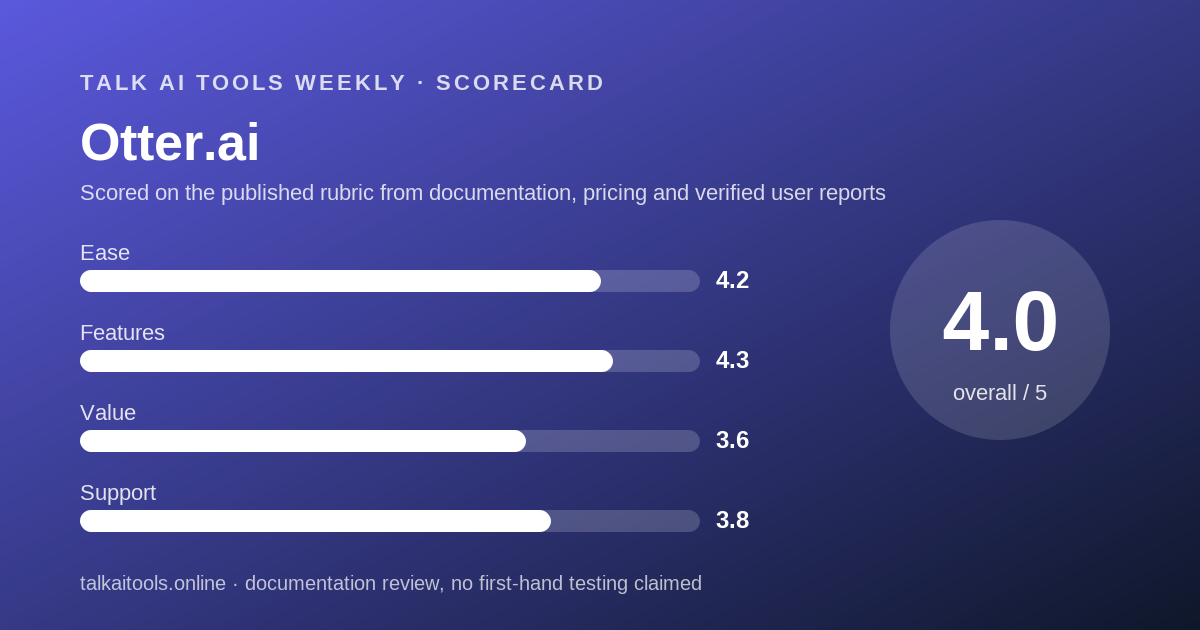
The 4.2 reflects breadth of entry points more than any single interface judgement. A notetaker that lives on the desktop, the phone, the browser and the calendar removes the most common failure, which is forgetting to start recording.
It loses ground on the limits themselves. Trustpilot reviewers, as of October 2026, repeatedly describe hitting usage caps unexpectedly. A 30-minute cut-off on a free conversation is easy to forget mid-call, and the pricing page notes that limits do not roll over.
The documentation is extensive, which helps, but the help centre returned an access error on the day we checked, so we could not verify the language list or the per-plan feature articles directly.
Features: what the score is built from
The 4.3 rests on the integration list and the agent layer. Salesforce, HubSpot and Zapier at the Pro tier is unusual; rivals typically hold CRM sync for business plans, as the Fathom review shows with its $25 Business tier.
The homepage also lists Slack, Claude, Google Drive, Dropbox, Google Docs, Jira, Notion, Glean and Asana, plus an MCP server for pulling meeting knowledge into AI chat tools. The MCP route matters more each month as teams standardise on one assistant; our note on how Copilot splits its bill explains why.
The deduction is for things the vendor does not publish. There is no language count, no stated accuracy figure, and the custom meeting templates are capped at 5, 15 and 30 per user on Basic, Pro and Business.
Value: what the score is built from
The 3.6 is the honest grade for a plan structure that is cheap at the entrance and expensive at the point most teams need it. At $8.33 per user per month annual, Pro is lower than Fathom Premium ($16 annual) and Krisp Core ($8 annual) is the only listed rival at the same level, per the three pricing pages checked October 10, 2026.
But Fathom's free plan lists unlimited recordings and transcriptions, and Krisp Core lists an unlimited note taker. Otter's unlimited tier is Business at $19.99, which is 2.4 times the Pro price by editorial arithmetic.
For a team that averages 40 minutes of recorded meetings a day, 1,200 minutes a month is roughly 30 hours and will usually hold. For a team that records everything, it will not.
Support: what the score is built from
The 3.8 balances two signals. On the positive side, Trustpilot reviewers as of October 2026 most often praise support speed, particularly on billing fixes, duplicate charges and refunds, and Trustpilot notes the company replied to 100 percent of negative reviews.
On the negative side, the same profile shows a typical reply time of more than a month, and 29 percent of 732 reviews are one star. Email support is the only channel listed for Basic; prioritised support starts at Business.
By comparison, Fathom draws the opposite pattern: a higher TrustScore but complaints that support is email-only.
What verified users report
On Trustpilot, Otter.ai held a TrustScore of 4.1 out of 5 from 732 reviews as of October 10, 2026, with 58 percent five-star and 29 percent one-star. Around 220 of those reviews arrived in the previous 12 months.
Praise clusters around time saved, ease of use and responsive support staff. Complaints cluster around transcripts that need heavy editing, strict usage limits and charges people did not expect.
Trustpilot states that it does not fact-check reviews. We did not read Capterra or G2 for this review because both returned access errors on the day we checked.
Privacy and data use
Otter's privacy and security page, read October 10, 2026, states that the company holds a SOC 2 Type 2 report maintained by an independent auditor, incorporates GDPR standards, follows HIPAA requirements without claiming certification, aligns with CCPA and bases its policies on ISO 27001/2.
Data sits in AWS S3 with AES-256 server-side encryption, and the encryption key is wrapped by a root key the vendor rotates. The page does not state a geographic region. Deleted conversations go to the Trash and are removed after 30 days.
The sentence buyers should read twice: Otter states it uses a proprietary method to de-identify user data before training its own models. It separately states that no customer data is used to train third-party AI providers' models and that imported Google Workspace documents are excluded.
Teams with strict policies should compare this with Krisp's flat statement that customer data is never used for training. Our note on usage policies and human review explains why these clauses are getting more attention.
Alternatives
Fathom is the first alternative to check. Its free plan lists unlimited recordings and transcriptions per the pricing page checked October 10, 2026, and its Team plan is $15 per user per month annual with a two-seat minimum. Choose Fathom if your meetings are mostly on Zoom, Meet or Teams and you want no meter at all. Otherwise choose Otter if you record in person on a phone. Read the full Fathom review and the head-to-head Otter vs Fathom.
Krisp is the second. It bundles noise cancellation with a bot-free note taker, transcribes English on the device, and states it never trains on customer data. Core is $8 per user per month annual. Choose Krisp if you take calls from noisy places or need the on-device privacy story. Otherwise choose Otter for the wider integration list. Read the full Krisp review.
Microsoft Copilot is the third, for teams already paying for Microsoft 365. Its notetaking lives inside Teams and its new billing splits seats from usage, which we unpacked in this week's Copilot edition. Choose Copilot if you never leave Teams. Otherwise choose Otter for Zoom and Meet coverage.
Bottom line
Otter.ai remains the broadest AI notetaker by device and platform, and Pro at $8.33 per user per month annual is a fair price for a team that can live within 1,200 minutes a month. Buy it for the reach and the Pro-tier CRM sync.
Skip it, or budget for Business at $19.99, if your calls run long or you want no meter at all. And read the model-training clause before you sign. This documentation review reflects pages checked October 10, 2026; prices and limits change, so confirm on the vendor's site. For the ranked view, see the best AI meeting note takers for small teams.
Buy it if
- You record meetings in person on a phone as often as on Zoom or Teams
- Your team's total call time fits inside 1,200 minutes per user per month
- You want Salesforce or HubSpot sync without paying for a business tier
- You prefer a notetaker with a long track record and a large help centre
Skip it if
- You run calls longer than 90 minutes and are not ready for the $19.99 Business plan
- Your policy forbids vendors training models on customer data, even de-identified
- You need SSO for a team smaller than 100 seats
Frequently asked
Is Otter.ai free?
Yes, with limits. The Basic plan, per the pricing page checked October 10, 2026, includes 300 transcription minutes a month, a 30-minute cap per conversation, three lifetime file imports, 20 AI Chat queries a month and history for the 25 most recent conversations. No credit card is required.
How much does Otter.ai Pro cost in 2026?
As of October 2026 the pricing page lists Pro at $8.33 per user per month billed annually or $16.99 month to month. The same page shows promotional figures of $4.17 and $8.49 marked 'save 50%' with an asterisk the page does not explain, so confirm the price at checkout.
How much does Otter.ai cost for a 10-person team?
Editorial arithmetic from the pricing page: 10 Pro seats on annual billing come to about $1,000 a year ($8.33 x 10 x 12). Ten Business seats, which remove the minute cap, come to about $2,399 a year ($19.99 x 10 x 12). Enterprise is by quote.
Does Otter.ai work without a bot joining the meeting?
Yes. The homepage, read October 10, 2026, describes a Mac and Windows desktop app that records without a bot joining the call, plus iOS and Android apps for in-person recording. The bot-style join is still available for Zoom, Teams and Google Meet through the calendar connection.
Does Otter.ai use my meetings to train AI?
Partly. Otter's privacy and security page states it de-identifies user data with a proprietary method before training its own models, with no human review. It also states that no customer data is used to train third-party AI providers' models and that imported documents are excluded.
Is Otter.ai HIPAA compliant?
Otter's security page says it follows HIPAA requirements but does not claim certification, and the pricing page lists HIPAA compliance as an add-on rather than a standard inclusion. Teams handling health information should ask sales for the add-on terms and a signed BAA before recording any patient conversation.
Sources
- Otter.ai pricing page - checked October 10, 2026
- Otter.ai privacy and security page - checked October 10, 2026
- Otter.ai homepage (platforms, integrations) - checked October 10, 2026
- Trustpilot: Otter.ai reviews - checked October 10, 2026
Update history
- October 10, 2026 - First published from pricing, security and homepage documentation plus Trustpilot, all checked October 10, 2026.
Visit Otter.ai
We have no affiliate relationship with this vendor. Link goes to the official site.