 Talk AI Tools

Krisp
Noise cancellation that grew a bot-free AI notetaker, with on-device English transcription and the clearest no-training statement of the three tools we reviewed this week
Scored on the published rubric, from documentation, pricing and verified user reports.
Best for: Remote workers and small teams who take calls from noisy places, want recording without a bot, and need a vendor that states in public it never trains on customer data.
Verdict
Krisp started as a virtual microphone that strips background noise and has turned that position, sitting between your headset and your meeting app, into a bot-free AI meeting assistant. This documentation review finds that the audio layer is still the reason to buy and the notetaker is the reason to keep paying. Per the pricing page checked October 10, 2026, Core costs $8 per user per month billed annually or $16 monthly and lists an unlimited bot-free note taker, noise cancellation, multilingual transcripts, AI chat, MCP integration and 10 GB of storage. Advanced at $15 annual adds Salesforce, admin controls and 60 GB. The security page for the meeting assistant states SOC 2 Type II, AES-256 at rest, TLS 1.2 in transit, on-device English transcription, US-only data storage and a flat statement that customer data is never used for model training. The weak points are a 7-day trial where rivals offer permanent free plans, a Trustpilot score of 3.0 driven by billing and renewal complaints, and desktop resource use that reviewers mention repeatedly. We did not run Krisp ourselves; grades come from the pricing page, two security pages, the homepage and 412 Trustpilot reviews, all read October 10, 2026.
Visit Krisp
We have no affiliate relationship with this vendor. Link goes to the official site.
Where it is strong
- Noise cancellation and the AI notetaker come in one $8 per user per month annual Core plan, per the pricing page checked October 10, 2026
- Bot-free by design: the desktop app is a virtual microphone and speaker, so no visitor joins the call
- English transcription runs on the device; the vendor states customer data is never used for model training
- SOC 2 Type II, PCI DSS, AES-256 at rest and TLS 1.2 in transit stated on the meeting assistant security page
- Works with any conferencing app at the audio level, including Slack Huddles and in-person recording
Where it falls short
- No permanent free plan listed for Meeting AI on the pricing page; the $0 option is a 7-day trial
- All data stored in the United States with no regional option, per the security page
- Trustpilot 3.0 out of 5 from 412 reviews, with billing, renewals and slow support as the main complaints
- Reviewers report high memory and CPU use from the desktop app
- Language support is stated as 16 in one place and 17 in another on the vendor's own pages
At a glance
| Starting price | $8/user/mo billed annually; $16 monthly (Core) |
|---|---|
| Pricing note | Core from $8/user/mo billed annually, $16 monthly; 7-day free trial, no card (pricing page, checked October 10, 2026) |
| Free plan | None listed for Meeting AI; 7-day free trial without a card |
| Storage | 10 GB on Core, 60 GB on Advanced, unlimited on Enterprise |
| Platforms | Desktop app (virtual mic), iOS and Android apps, Chrome extension; any meeting app |
| Compliance | SOC 2 Type II, PCI DSS; HIPAA supported with BAA on Business tier |
| Data location | United States only (AWS); summaries processed via Microsoft Azure |
| Languages | On-device English plus 15 server-side languages |
What Krisp actually is
Krisp is a desktop app that installs itself as a virtual microphone and speaker. Every meeting app on the machine can select it as its audio device, and Krisp removes background noise in both directions before the audio reaches the call.
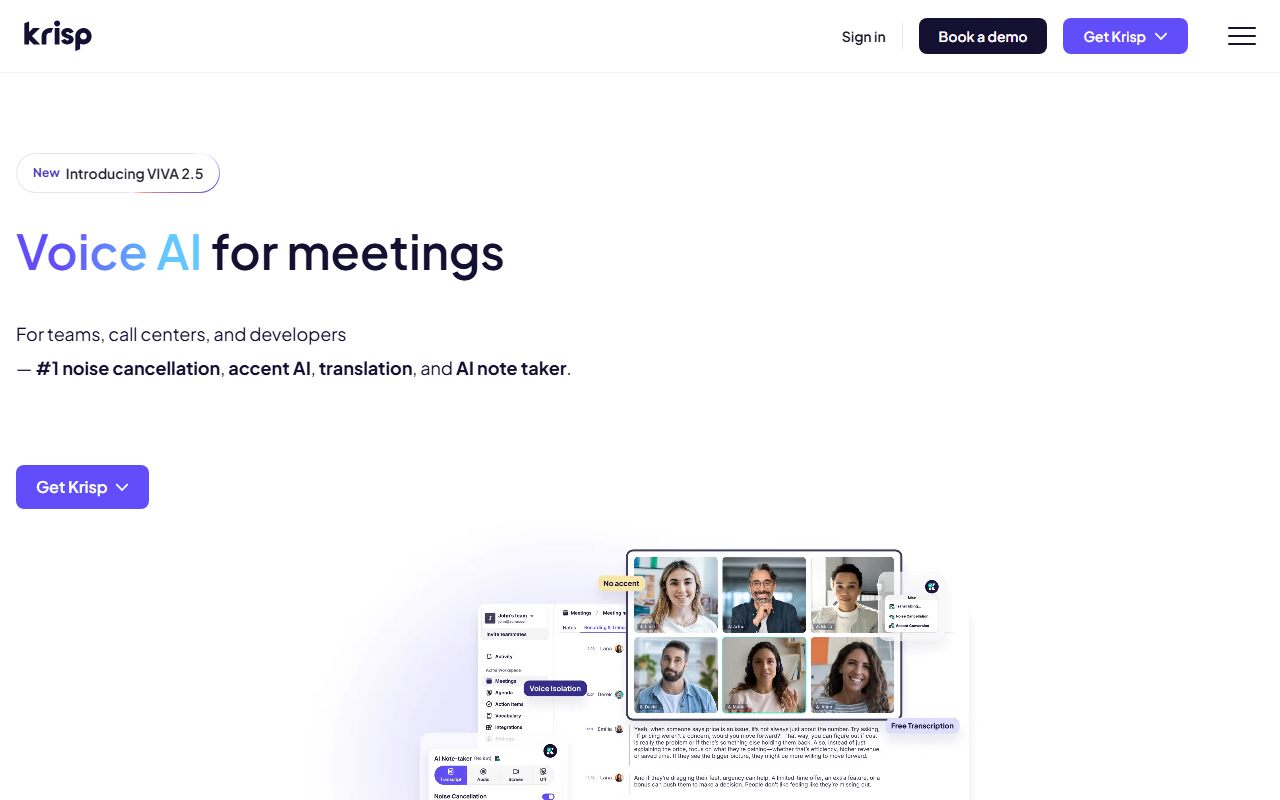
That position in the audio chain is what makes the notetaker bot-free. Because Krisp already hears both sides of the conversation, it can transcribe and summarise without a visitor joining the meeting. The meeting assistant page, read October 10, 2026, calls this the biggest difference from rivals.
The product now has three lines: the AI Meeting Assistant for individuals and teams, Call Center AI for contact centres, and a developer SDK for voice isolation and turn-taking. This review covers the Meeting Assistant only.
The homepage, as of October 2026, adds mobile apps on iOS and Android, a Chrome extension for browser-based calls, and a note that the desktop app also records in-person meetings. How this compares with bot-first rivals is in our best AI meeting note takers guide.
Who Krisp is best for
Krisp suits people whose problem starts before the transcript: the audio itself.
- Remote workers who take calls from shared spaces and are judged on how they sound
- Support and sales reps on headsets all day who want noise removal and notes in one seat
- Teams whose clients use conferencing tools a bot cannot join, including Slack Huddles
- Security-conscious teams that want on-device English transcription and a public no-training statement
- Non-native English speakers who want the accent conversion feature, listed at one hour a day on Core
- Teams already using MCP-connected assistants, since MCP integration is listed on Core
Who should skip it
Three groups are better served elsewhere.
- Anyone who wants a notetaker that is free for ever: Fathom lists unlimited free recordings and Otter lists 300 free minutes a month
- EU or UK organisations that need regional data residency, which the security page says Krisp does not offer
- Teams that dislike background desktop agents; reviewers repeatedly mention memory and CPU use
What each plan includes (as of October 2026)
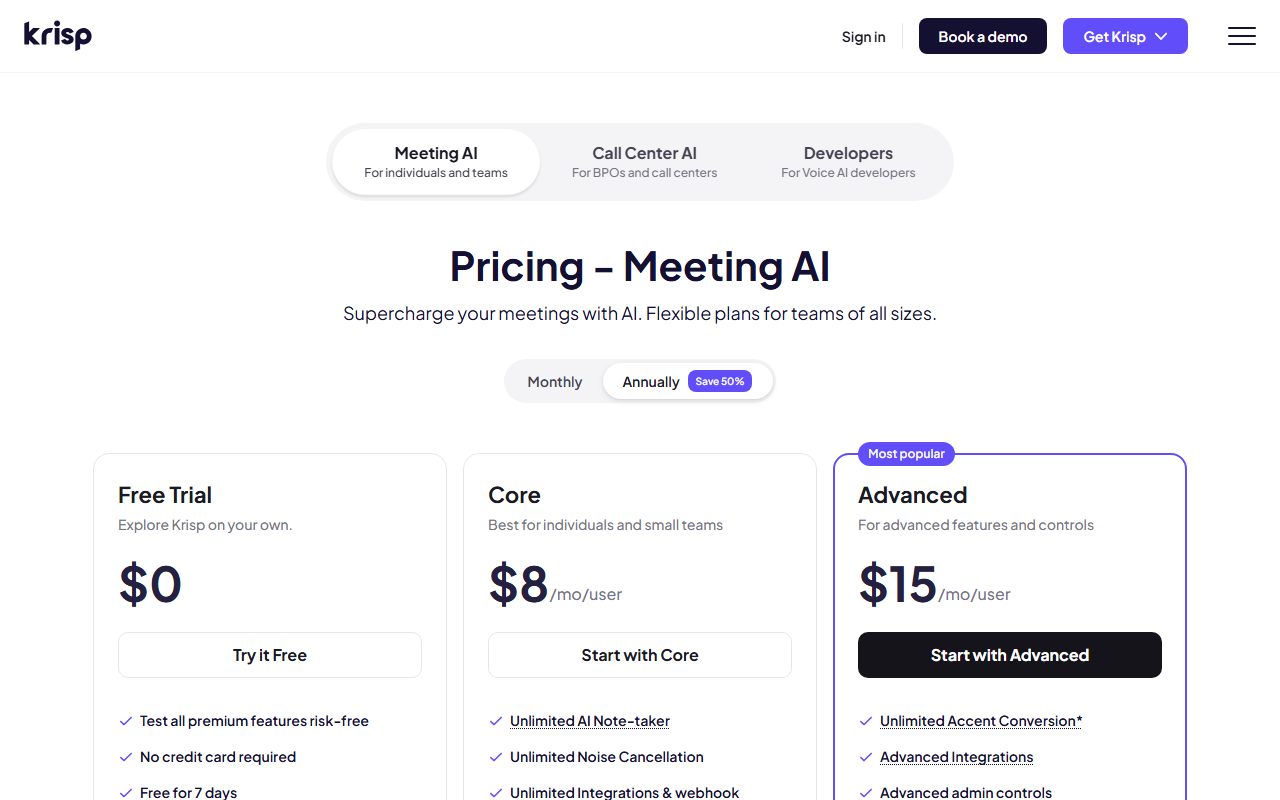
The pricing page, checked October 10, 2026, lists four Meeting AI tiers.
Free Trial lasts seven days with no credit card and includes unlimited transcription, noise cancellation, audio and video recording, and AI notes and action items. Accent conversion is limited during the trial.
Core, described as best for individuals and small teams, lists an unlimited bot-free AI note taker, noise cancellation, integrations and webhooks, multilingual transcripts, AI chat, the mobile app, accent conversion for one hour a day on both speaker and listener sides, team and billing management, MCP integration and 10 GB of storage.
Advanced, marked most popular, adds accent conversion for four hours a day on the speaker side and unlimited on the listener side, Salesforce and ConnectWise integrations, admin controls for link sharing and note-taking mode, a manager view, company deal grouping, trim and comment, team-level webhooks and 60 GB of storage.
Enterprise adds SSO and SCIM, a super admin role, a dedicated account manager, usage analytics, unlimited storage, private on-device transcription and recordings, a choice of data centre location, SOC 2 report access, and BAA signing for teams of 100 or more seats.
The storage figures matter because recordings are stored in Krisp's cloud only after the user opts in, per the security page. A team that keeps video will reach 10 GB sooner than one that keeps transcripts.
How the pricing is structured
Per the pricing page on October 10, 2026, Core is $16 per user per month billed monthly or $8 billed annually; Advanced is $30 monthly or $15 annually; Enterprise is custom. The annual toggle is labelled 'save 50%', and by editorial arithmetic that label is accurate for both tiers.
Every teammate added to a team counts as a seat. There is no stated minimum seat count. Volume discounts apply above 50 members, and invoicing is Enterprise-only; other plans pay by card.
For a 10-person team, Core annual is $960 a year and Advanced annual is $1,800. That makes Core the cheapest annual multi-seat price we found this week, matching Otter Pro at $8.33 and undercutting Fathom Team at $15, per the three pricing pages.
The trade is the trial. Seven days is short for a product that needs a week of real meetings to judge, and the lack of a permanent free tier is the main reason Krisp sits below Fathom in the Otter vs Fathom context and in our ranking.
Ease of use: what the score is built from
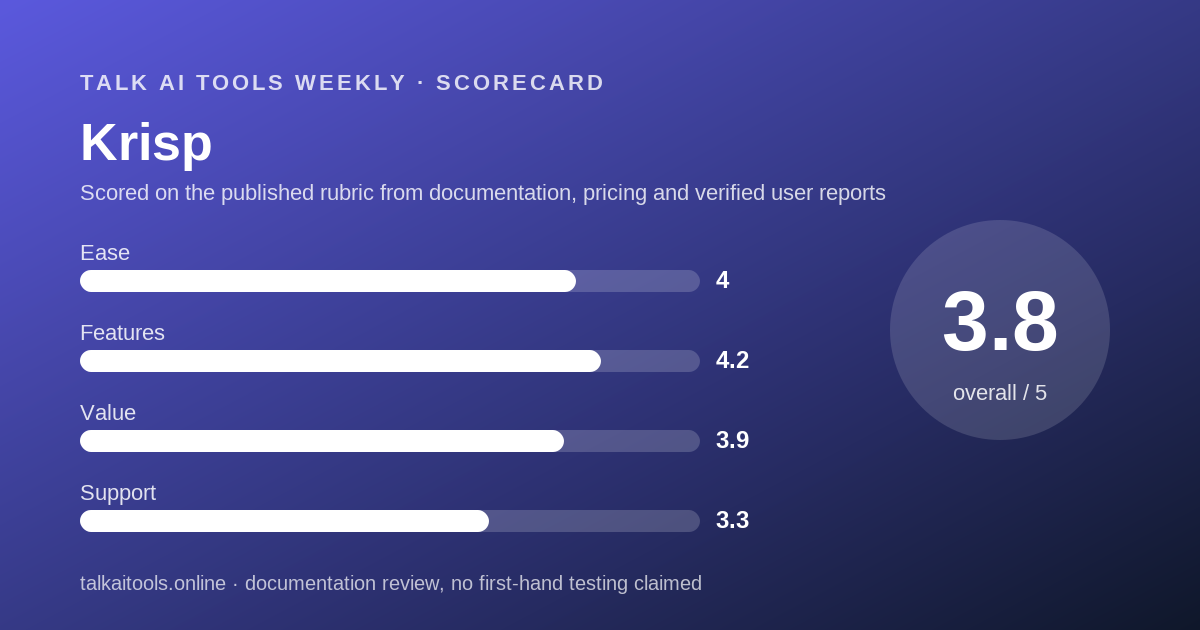
The 4.0 credits the bot-free model, which removes the join-failure problem that Fathom and Otter reviewers describe, and the fact that noise cancellation works with any app once Krisp is the selected microphone.
It debits the desktop footprint. Trustpilot reviewers as of October 2026 report high memory and CPU use even when idle, difficulty uninstalling, unwanted start-up behaviour and calendar entries they did not request. A virtual audio device is more invasive than a browser extension, and some users feel it.
The help centre returned an access error on the day we checked, so per-plan setup guides could not be verified.
Features: what the score is built from
The 4.2 rests on three things no rival in this week's set matches: noise cancellation in the same seat, on-device English transcription, and accent conversion. The homepage also shows a 4.7 rating on G2 and a G2 Leader badge for Summer 2026, which we report as vendor-displayed.
Integrations listed across the pricing and product pages include Zapier, HubSpot, Salesforce, Pipedrive, Slack, Asana, Jira, monday.com, webhooks and MCP. Salesforce and ConnectWise are Advanced-only.
The deduction is for inconsistency in the vendor's own documentation: 16 languages on the homepage, 17 on the product page, and a security page that does not say whether noise cancellation itself runs on the device. Otter's integration list, covered in our Otter.ai review, is longer at the entry tier.
Value: what the score is built from
The 3.9 reflects a strong paid price and a weak free offer. At $8 per user per month annual, Core is the lowest paid seat among the three notetakers we reviewed this week, and it includes a product, noise cancellation, that many teams would otherwise buy separately.
Against that, Fathom lists unlimited free recordings and Otter lists 300 free minutes a month, while Krisp lists a 7-day trial. For a solo user who records a few calls a week, Krisp is the only one of the three that costs money.
Storage caps of 10 GB and 60 GB are another limit the others do not publish; Otter lists unlimited storage from Pro.
Support: what the score is built from
The 3.3 is the lowest grade we gave any product this week. Trustpilot, as of October 10, 2026, shows Krisp replying to 37 percent of negative reviews with a typical response time of more than a month. Complaints centre on unexpected renewals, refused prorated refunds and slow replies on cancellation requests.
The pricing page lists a dedicated account manager only for Enterprise and priority support only for Call Center tiers.
Some reviewers do praise staff for resolving unauthorised charges. But the pattern, 15 percent one-star reviews mostly about billing, is a warning to set a calendar reminder before any annual renewal.
What verified users report
On Trustpilot, Krisp held a TrustScore of 3.0 out of 5 from 412 reviews as of October 10, 2026, with about 78 percent five star and 15 percent one star. Only 25 reviews arrived in the previous 12 months, so the profile is older than Fathom's or Otter's.
Praise: noise cancellation that works, time saved by AI notes and task tracking, and occasional fast refunds.
Complaints: renewals charged without notice, slow support, memory and CPU use, difficult removal, lost meeting notes, inability to choose which call to record, and repeated marketing emails. One reviewer noted the noise filter affected certain speech sounds in pronunciation work. Trustpilot states it does not fact-check reviews. The vendor-displayed G2 figure of 4.7 could not be verified because G2 returned an access error.
Privacy and data use
Krisp publishes the most specific security page of the three tools we reviewed this week, and it is worth reading in full. As of October 10, 2026, the AI Meeting Assistant security page states SOC 2 Type II with the report available from the trust centre, PCI DSS certification, and controls that support HIPAA, with a BAA available to Business-tier subscribers.
Encryption is TLS 1.2 in transit and AES-256 at rest, both stated as applying without exception. All data is stored on servers in the United States, hosted on AWS, with no regional storage option at this time.
Processing is split. English transcription uses Krisp's in-house speech-to-text on the user's device. Meeting summaries are generated through Microsoft Azure services, which the page says do not use customer data for internal training. Krisp's own statement is unambiguous: neither Krisp's data nor customers' data is ever used for model training.
Meeting data is stored in Krisp's cloud only after the user opts in. Deleted transcripts and summaries are described as completely wiped, and account deletion removes associated data irreversibly. The retention period for PHI is governed by a policy the page references but does not reproduce. For why these clauses now matter in procurement, see our note on usage policy and the human reviewer rule.
Alternatives
Fathom is the alternative for anyone who wants to start free. Its pricing page lists unlimited recordings and transcriptions on the free plan and a $15 annual Team seat with a two-seat minimum. Choose Fathom if you record on Zoom, Meet or Teams and do not need noise cancellation. Otherwise choose Krisp for the audio layer and the on-device story. Read the full Fathom review.
Otter.ai is the alternative for mobile and in-person recording and for CRM sync at the entry tier. Pro lists Salesforce, HubSpot and Zapier at $8.33 per user per month annual, but meters minutes until the $19.99 Business plan. Choose Otter if you need those integrations below $15 or record on a phone daily. Otherwise choose Krisp for unmetered notes. Read the full Otter.ai review and our Otter vs Fathom comparison.
Google's Gemini audio models are the platform alternative. Gemini 3.8 Live and 3.5 Transcribe, covered in our AI credits and security metering edition, bring real-time transcription to developers and to Meet. Choose Google if you build your own tooling or live in Workspace. Otherwise choose Krisp for a finished product that works across every app.
Bottom line
Krisp is the right AI meeting assistant for people whose first problem is audio and whose second is privacy. One $8 annual seat buys noise cancellation, a bot-free notetaker, on-device English transcription and the clearest no-training statement we read this week.
It is the wrong choice for anyone who wants a free tier that lasts, needs data outside the United States, or has a low tolerance for billing friction; the Trustpilot record on renewals is the reason the support grade is 3.3. This documentation review reflects pages checked October 10, 2026; confirm current terms on the vendor's site. For the ranked comparison, see the best AI meeting note takers for small teams.
Buy it if
- You take calls from cafes, open offices or home with children and need noise removal first
- Your security team wants on-device transcription and a public no-training statement
- You meet on apps that bots cannot join, such as Slack Huddles or a client's unusual platform
- You want noise cancellation and notes for one $8 annual seat instead of two subscriptions
Skip it if
- You want a free plan that never expires; Fathom and Otter both list one
- Your data must stay in the EU or another non-US region
- You need Salesforce sync at the entry tier; Krisp holds it for Advanced at $15 annual
Frequently asked
Does Krisp have a free plan?
Not for the meeting assistant as listed on October 10, 2026. The pricing page shows a 7-day free trial at $0 with no credit card, including unlimited transcription, noise cancellation and AI notes for the trial period. The homepage says 'Get Krisp for free' but does not state limits for a permanent free tier.
How much does Krisp cost in 2026?
Per the pricing page checked October 10, 2026, Core is $16 per user per month billed monthly or $8 billed annually. Advanced is $30 monthly or $15 annually. Enterprise is custom. Call Center AI starts at $15 per agent per month annually. The page marks the annual toggle as 'save 50%'.
How much does Krisp cost for a 10-person team?
Editorial arithmetic from the pricing page: 10 Core seats on annual billing come to $960 a year ($8 x 10 x 12); on monthly billing, $1,920. Ten Advanced seats annual come to $1,800. Volume discounts are offered above 50 members, per the page.
Does Krisp record meetings without a bot?
Yes. The meeting assistant page states that you do not need a bot in your meeting, because the desktop app works at the audio level as a virtual microphone and speaker. An optional bot is available for platforms such as Zoom if you prefer a visible recorder.
Does Krisp use my meetings to train its AI?
The security page for the AI meeting assistant states that neither Krisp's data nor customers' data is ever used for model training, and that Microsoft Azure, which generates summaries, does not use customer data for training either. English transcription runs on the device; data is stored only in the United States.
Which languages does Krisp transcribe?
The homepage, read October 10, 2026, lists on-device English plus server-based Spanish, French, German, Russian, Italian, Dutch, Polish, Portuguese, Hindi, Danish, Swedish, Norwegian, Czech, Ukrainian and Korean, 16 in total. The meeting assistant page says 17 languages. Treat the exact count as unsettled.
Sources
- Krisp pricing page - checked October 10, 2026
- Krisp security for AI Meeting Assistant - checked October 10, 2026
- Krisp AI Meeting Assistant product page - checked October 10, 2026
- Krisp homepage (languages, platforms, G2 badge) - checked October 10, 2026
- Trustpilot: Krisp reviews - checked October 10, 2026
Update history
- October 10, 2026 - First published from pricing page, two security pages, homepage and Trustpilot, all checked October 10, 2026.
Visit Krisp
We have no affiliate relationship with this vendor. Link goes to the official site.