 Talk AI Tools

OpusClip
Turns one long recording into vertical clips, priced by the minute of footage processed
Scored on the published rubric, from documentation, pricing and verified user reports.
Best for: A team with hours of existing long-form video that needs a steady supply of vertical clips.
Verdict
OpusClip does one job and prices it in a unit anyone can count. This is a documentation review, built from the vendor's pricing page and its plan comparison table, read on October 26, 2026, plus the public Trustpilot listing read the same day. No account was opened.
The meter is honest. A tooltip on the pricing page defines one credit as one minute of video processing, so 150 credits is 150 minutes of source footage. That is far easier to budget than a generic credit.
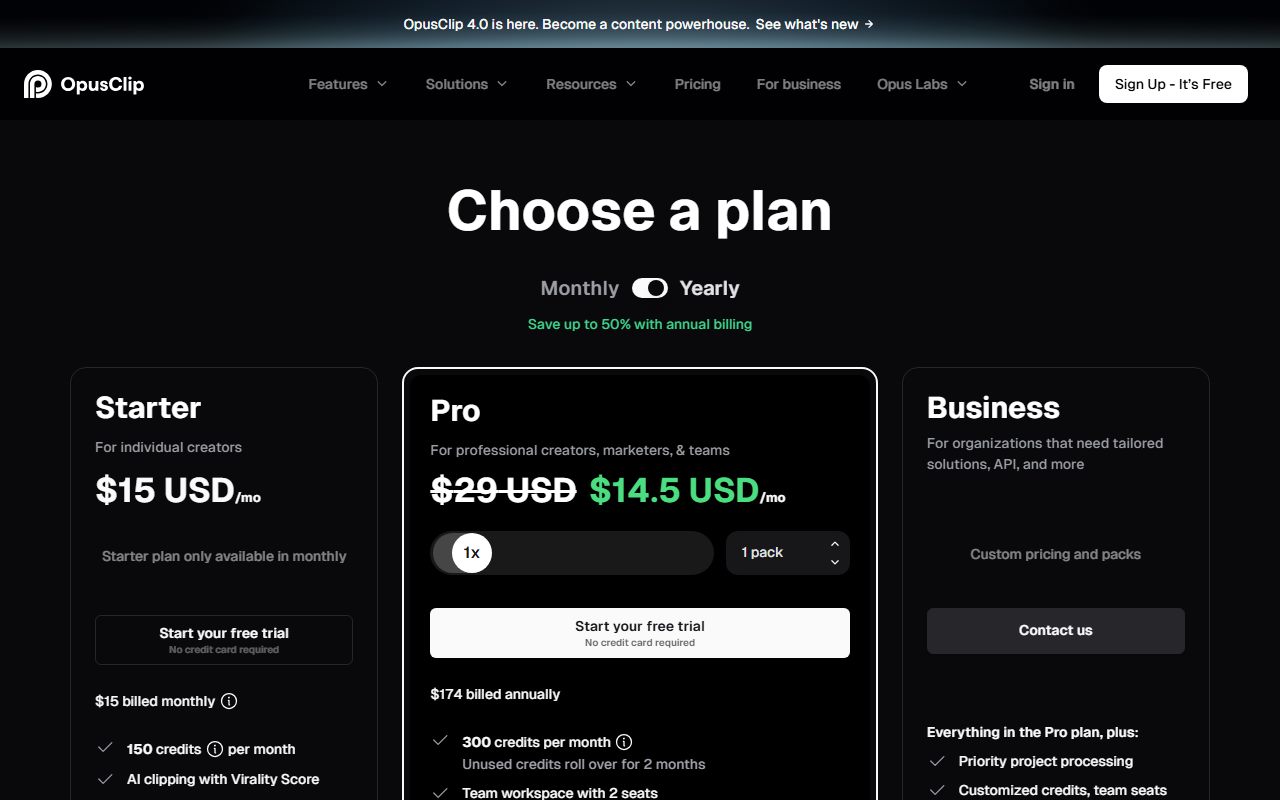
Starter is listed at $15 a month and is monthly only. Pro is $29 a month, or $14.50 a month billed annually at $174 for the year, which is exactly the 50 percent saving the page advertises.
The gaps are team size and support. Pro tops out at four users, and the support row for the lower plans lists Discord and AI chat rather than email or a human channel.
Visit OpusClip
We have no affiliate relationship with this vendor. Link goes to the official site.
Where it is strong
- One credit equals one minute of video processing, per the tooltip on the pricing page, so the bill is countable in advance
- Pro credits roll over for two months, which is unusual in a category where unused allowance normally vanishes
- The annual price on Pro, $174 for the year, is exactly half the monthly rate over twelve months by our arithmetic
- A genuine free tier gives 60 credits a month with no credit card required, per the pricing page
- Trustpilot shows 4.0 out of 5 across 509 reviews as of October 26, 2026, with 100 percent of negative reviews answered
Where it falls short
- Starter is billed monthly only, per the plan card, so the cheapest paid tier cannot be discounted annually
- Pro seats are listed as 2 users per pack, up to 4 users, so a fifth editor forces a Business conversation
- The support row lists Discord and AI chat on the self-serve plans, with custom onboarding only on Business
- Free plan clips carry a watermark and stop being exportable after three days, per the plan comparison
- Editing, B-roll, voice-over and dubbing all sit above Free, so the free tier shows the clipping engine only
At a glance
| Starting price | $0 Free; $15/mo Starter, monthly only; $29/mo Pro or $174/year (pricing page, October 26, 2026) |
|---|---|
| Pricing note | From $15 a month on Starter, monthly billing only; Pro is $29 a month or $174 billed annually (pricing page, checked October 26, 2026) |
| Free plan | Yes - 60 credits a month, 1080p clips, watermarked, exports expire after 3 days |
| Credit unit | 1 credit = 1 minute of video processing, per the pricing page tooltip |
| Credit allowance | 60 a month Free, 150 Starter, 300 Pro, custom on Business |
| Seats | None on Free or Starter; 2 users per pack up to 4 users on Pro; unlimited on Business |
| Support channels | Discord and AI chat on the self-serve plans; custom onboarding and an MSA on Business |
| Security | SOC II Type 2 compliant per the comparison table; SSO and licence management on Business |
What OpusClip actually is
OpusClip is a clipping engine with a publishing tail, not a video editor, and reading it that way makes the price make sense.
You point it at a long recording. It transcribes, picks the moments it thinks will travel, reframes them vertically, burns in animated captions and hands back a set of shorts.
The vendor attaches a virality score to each suggested clip on the paid tiers. That number is a ranking signal from the tool, not an outcome anyone can verify, and we treat it as such.
Around the engine sit the pieces you need to actually post: a scheduler, direct posting to YouTube Shorts, TikTok and Instagram Reels, and a title, description and hashtag generator on paid plans.
Above that again sits an editor, B-roll, voice-over, dubbing and speech cleanup. Those are real features, but they are refinements of the clip, not a timeline for building something new.
Who OpusClip is best for
The fit is narrow and the tool is honest about it.
- A podcaster or interviewer with a back catalogue of long episodes and no time to cut them
- A marketing team that films webinars and needs a weekly stream of short clips from them
- A livestreamer who wants yesterday's broadcast turned into a week of vertical posts
- A solo creator testing whether short-form is worth the effort, using the 60 free credits a month
- A small agency that can live inside four user seats on Pro and wants per-minute cost visibility
- Anyone who needs posting and scheduling bundled rather than paying for a separate scheduler
Who should skip it
Three groups will be disappointed.
- Anyone who needs to assemble original long-form video, where a transcript-based editor does far more
- Anyone with five or more editors, because the Pro seat row reads 2 users per pack, up to 4 users
- Anyone whose scheduling needs are serious, where a dedicated tool such as Buffer or Metricool gives more control over the calendar
What the free plan includes as of October 2026
The free tier is a working demonstration of the clipping engine and nothing beyond it.
Per the plan comparison read on October 26, 2026, Free gives 60 credits a month, which is 60 minutes of source footage at the vendor's own definition of a credit.
Clips render up to 1080p with auto reframe and AI captions, including emoji and keyword highlighting. They carry a watermark, and the card states that after three days the clips are no longer exportable.
Editing is not included on Free. Neither is bulk export, posting to social media, the scheduler, brand templates, or the virality score.
The page states no credit card is required, and offers a free trial of the paid tiers on the same terms. The three-day export window is the real limit: it is enough to judge clip quality, not enough to build a backlog for free.
How the pricing is structured
There are three published tiers and one quoted tier, and the unit of account is the useful part. Figures below are from the pricing page, checked October 26, 2026.
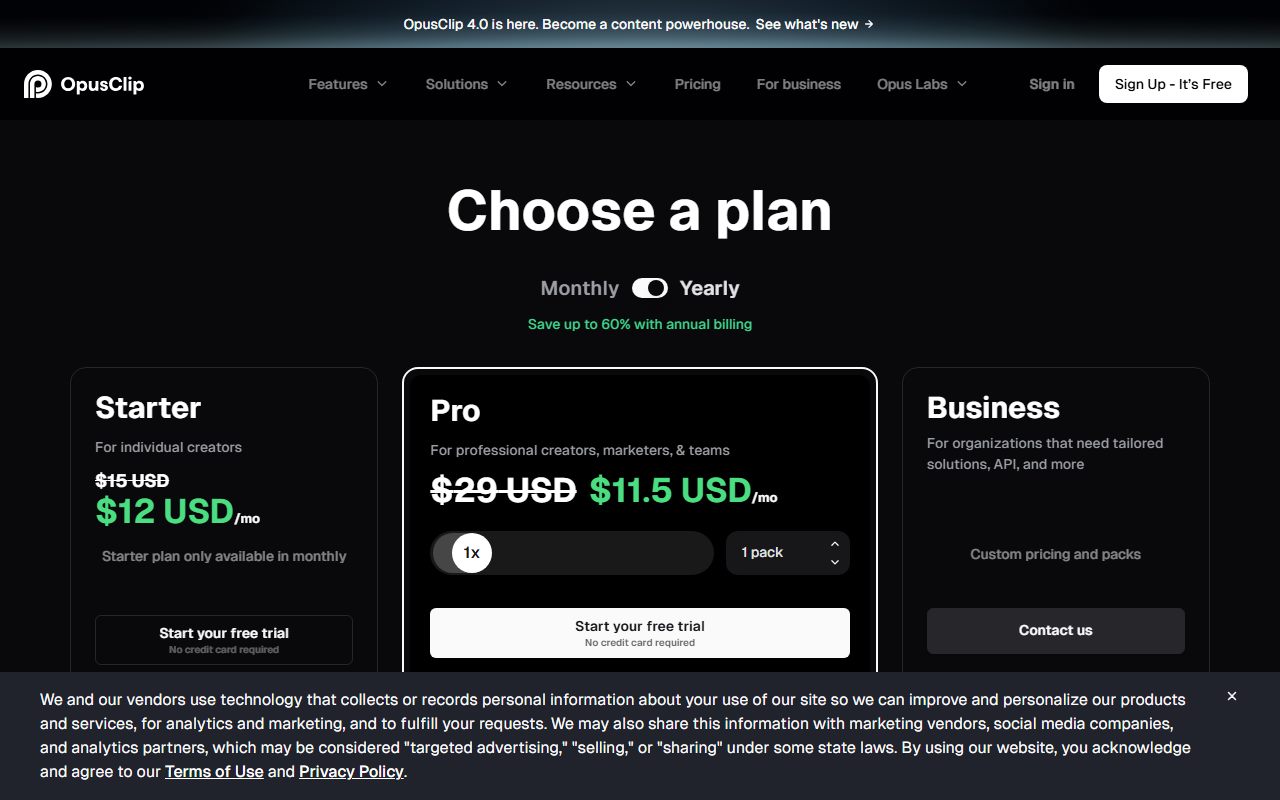
Free is $0 with 60 credits a month. Starter is listed at $15 a month with 150 credits, and the card carries a note that Starter is only available monthly.
Pro is listed at $29 a month, or $14.50 a month billed annually, shown on the card as $174 billed annually. It carries 300 credits a month, rollover for two months, a team workspace with 2 seats, 2 brand templates and 6 social account connections.
Business is marked custom with unlimited seats, SSO, software licence management, a master service agreement and invoice or ACH payment.
The annual claim checks out. By our arithmetic $14.50 times twelve is $174, and $174 against $29 over twelve months is a saving of exactly 50 percent, which is what the page advertises.
Pro also sells credits in packs. A selector runs from one to fifteen packs, with seats scaling at 2 users per pack to a ceiling of 4.
The pack price is not printed on the page, which is the one real gap in an otherwise clear pricing sheet.
Ease of use: what the score is built from
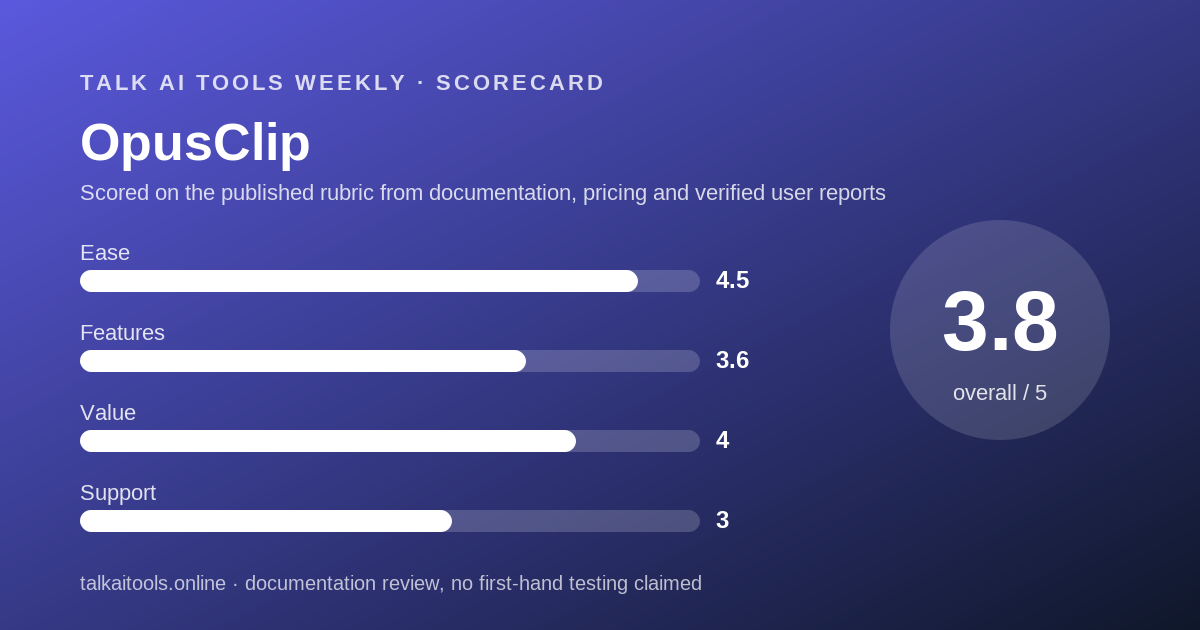
Ease scores 4.5 of 5, the highest column on this card, and almost all of it comes from the shape of the job.
A tool that takes one input and returns finished clips has very little surface to learn. There is no project structure to design and no timeline to understand.
The pricing page deserves credit too. Defining a credit as one minute of video processing, in a tooltip right next to the number, is the clearest unit we have seen in this category.
Compare that with allowances expressed as generic AI credits, where nobody can tell what a month costs until they have used one. We wrote about that pattern in the spotlight on AI credit meters.
We deduct a little for the credit packs, whose price is not published, and for a free tier where the export window closes after three days.
Features: deliberately narrow, with a publishing tail
Features score 3.6 of 5. The score is not a criticism of quality; it reflects a tool that chose a narrow job.
On the clipping side the paid tiers add real control: selecting the clipping timeframe, choosing clip length from five published bands, re-prompting the clipper to refine results, and auto hooks.
Captions are listed in more than twenty languages with animated templates, speaker-based colours, custom font upload and automatic censoring of curse words on higher tiers.
Reframing goes beyond a crop. The table lists moving object tracking, a genre-specific reframing model, dynamic layout switching and a screenshare or gameplay layout.
The publishing tail is the part small teams underrate. Scheduling, posting to multiple profiles per platform, and a title, description and hashtag generator all sit inside the paid plans.
What is missing is long-form assembly. There is an editor, but it exists to adjust clips. If you also write the words around the video, our shortlist of AI SEO content tools covers that half of the job.
Value: the cheapest predictable minute in this cluster
Value scores 4.0 of 5, graded on what the published price buys at one, two and four users.
At one user, Starter at $15 a month for 150 minutes of processing works out at ten cents a minute of source footage by our arithmetic. That is the clearest cost-per-unit figure in this cluster.
At two users, Pro billed annually is $174 for the year, which is $14.50 a month for 300 credits and a two-seat workspace. The per-minute figure falls to just under five cents by our arithmetic.
At four users, Pro still works but needs credit packs, and the pack price is not published. That turns a clear pricing sheet into a sales conversation at exactly the point a growing team needs certainty.
The rollover on Pro is worth real points. Two months of carried credits absorbs the natural rhythm of a team that films in bursts.
Starter being monthly only is the odd note. It means the entry plan is the only tier with no annual discount, which nudges a serious buyer straight to Pro.
Support: Discord and AI chat on the plans most people buy
Support scores 3.0 of 5, and the reason is printed on the vendor's own comparison table.
The customer support row lists Discord and AI chat. Those are the channels attached to the self-serve plans, which is what a solo creator or a four-person team will be buying.
Custom onboarding, a master service agreement, and invoice or ACH payment appear on Business, which is quoted on request.
No response-time commitment is published for any tier that we could find on October 26, 2026, so we grade channels and documentation only.
One thing lifts the score. Trustpilot's company panel records that OpusClip replies to 100 percent of negative reviews and typically replies within 24 hours. That is a public, measurable behaviour rather than a marketing claim.
We did not measure support response times ourselves and will not estimate them.
What verified users report
Public sentiment is the strongest in this cluster, with one caveat attached to how it was collected.
On Trustpilot, read October 26, 2026, OpusClip holds 4.0 out of 5 across 509 reviews. On the same date Descript sat at 2.6 from 291 reviews and VEED at 4.2 from 3,915.
The caveat is in Trustpilot's own panel. It records that OpusClip asks customers to review, whether positive or negative. Invited reviews reliably run higher than uninvited ones.
The same panel records that the company replies to 100 percent of negative reviews within about 24 hours, which is a genuinely good signal regardless of how the reviews arrived.
Trustpilot's related listings on the same page show two narrower competitors scoring higher still: Vizard.ai at 4.7 and Submagic at 4.5. Neither has been graded here, and we are not ranking tools we have not read properly.
We are reporting scores and collection methods, not causes. None of these samples is large enough to settle an argument on its own.
Limits and data handling stated by the vendor
The pricing page carries less security detail than some rivals, and what it does carry is worth reading.
The comparison table lists SOC II Type 2 compliance across the plan columns, with single sign-on and software licence management reserved for Business.
Email one-time-password login is listed as the standard authentication method on the self-serve plans. Teams that require SSO will be in the Business column by policy rather than by size.
Media storage is the limit most buyers will hit first. The table lists storage expiring after three days on Free and after 29 days on the paid tiers, so the tool is not an archive.
The footer identifies the company as Opusclip Inc. and links separate terms, privacy policy and a trust centre.
What we did not find on the pricing page, read October 26, 2026, is any statement about whether uploaded footage is used to train models. That belongs on a pricing page in this category, and its absence is a question to put to the vendor.
Alternatives worth reading before you decide
Three alternatives cover most reasons a reader would reject OpusClip.
Choose Descript if you need to build and cut the long video as well as slice it, and you can live with two meters. Its Hobbyist plan is listed at $16 a seat a month billed annually.
Choose VEED if you want generative video, voices and avatars in the same seat. Its Creator plan is listed at $116 a year per user with 6,000 credits.
Choose a transcription tool if the words are the deliverable rather than the clips. Otter.ai and Fathom both cost less for that job.
Otherwise choose OpusClip if you have footage sitting unused, you want a per-minute price you can forecast, and your team fits inside four seats.
Whichever you pick, the clips still need captions that read well and copy that ranks. Jasper and the Surfer SEO against Frase comparison cover the writing side of the same workflow.
Bottom line
OpusClip earns 3.78 of 5 on our four-column rubric and has the clearest pricing unit in this category.
It is the right pick when the problem is a backlog of long video and the goal is a steady output of shorts. Ten cents a minute of source footage on Starter, by our arithmetic, is a number a small team can plan around.
It is the wrong pick when you need to build long-form video, when you have five or more editors, or when you need a human support channel below the Business tier.
Before buying, count the minutes of footage you actually want processed each month. That number maps one to one onto credits, which is rare enough to be worth using.
The wider pattern here is a seat price plus a usage meter, which is now the default in small-team software, as the week Copilot split the bill showed.
Every figure above was read on the vendor's own pricing page on October 26, 2026. Credit allowances and plan names in this category change often, so check the date before trusting the number.
Buy it if
- You already have a library of long videos and the only missing step is cutting them into shorts
- You want to count the bill in minutes of footage, which is what a credit buys here
- You post to several short-form platforms and want scheduling and posting inside the same tool
- You want to try the engine for nothing, because the free tier gives 60 credits a month without a card
Skip it if
- You need a full editor for long-form video, which this tool is not built to replace
- You have five or more editors, because Pro is capped at four users
- You need a human support channel, because the self-serve plans list Discord and AI chat
Frequently asked
What is an OpusClip credit?
One credit equals one minute of video processing, per the tooltip beside the credit figure on the pricing page, checked October 26, 2026. On that basis Starter's 150 credits covers 150 minutes of source footage a month.
Does OpusClip have a free plan?
Yes. The pricing page lists a free forever tier at $0 with 60 credits a month, clips up to 1080p, auto reframe and AI captions. Clips carry a watermark and stop being exportable after three days.
Is OpusClip cheaper billed annually?
On Pro, yes. The card lists $29 a month or $14.50 a month billed annually, shown as $174 billed annually. Starter carries a note that it is only available monthly, so the $15 rate has no annual discount.
How many people can use one OpusClip plan?
The comparison table lists no member seats on Free or Starter, 2 users per pack up to 4 users on Pro, and unlimited seats on Business. Business pricing is marked custom and quoted on request.
Do unused OpusClip credits expire?
On Pro the card states unused credits roll over for two months. The free and Starter cards carry no rollover statement, so treat those allowances as use-it-or-lose-it until the vendor says otherwise.
How do you contact OpusClip support?
The comparison table lists customer support as Discord and AI chat for the self-serve plans, with custom onboarding and a master service agreement on Business. No response-time commitment is published for any tier.
Sources
- OpusClip pricing page and plan comparison - checked October 26, 2026
- OpusClip reviews on Trustpilot - checked October 26, 2026
Update history
- October 26, 2026 - First publication. Plan prices, credit allowances, the one credit equals one minute definition, seat ceilings, storage expiry and support rows read from the vendor's pricing page on this date. Trustpilot score and company panel notes read the same day. The credit pack price is not published on the page and is therefore not quoted.
Visit OpusClip
We have no affiliate relationship with this vendor. Link goes to the official site.