 Talk AI Tools
Maestra
Transcription, subtitles, voiceover and live captions sold from one credit pool whose value changes tenfold by job
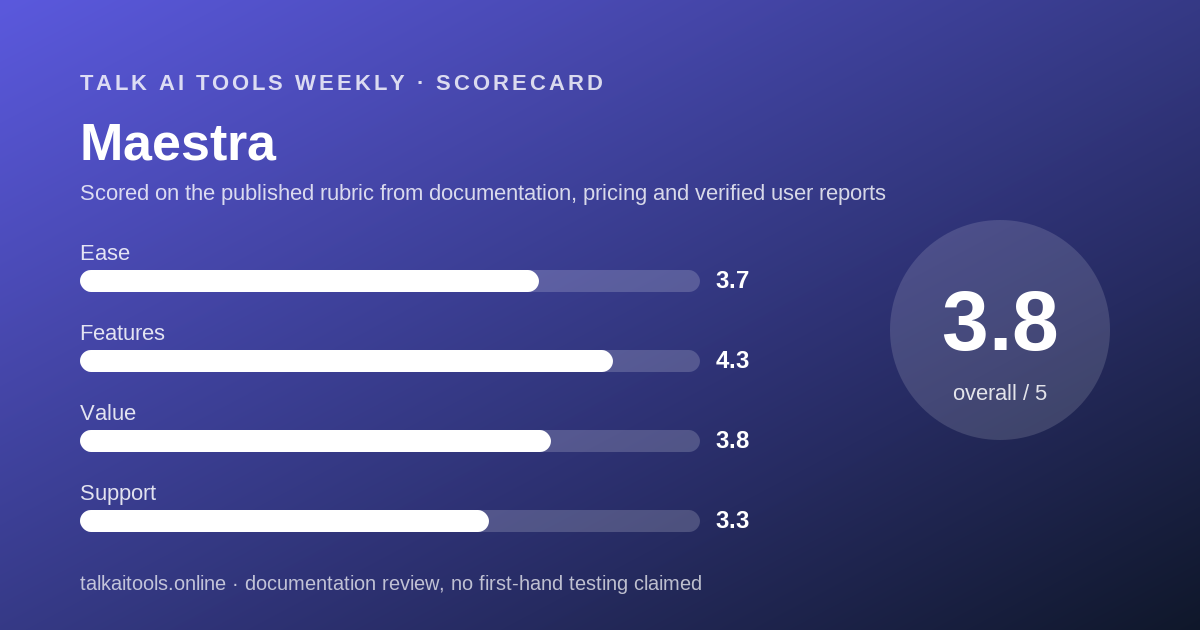
Scored on the published rubric, from documentation, pricing and verified user reports.
Best for: A team that needs subtitles and stock-voice voiceover in volume, and has an afternoon to work out what its own credits are worth.
Verdict
Maestra is the cheapest tool on this shortlist per finished minute, and the hardest pricing page on this shortlist to read, and both of those facts come from the same design decision.
This is a documentation review, built from the vendor's pricing page, its four plan tables, its FAQ and its enterprise page, all read on November 2, 2026. No account was opened and no first-hand claims are made below.
One page carries four separate pricing tables: transcription, subtitle, voiceover and real-time. The plan names and prices repeat across all four, but the minute allowances do not.
A Premium plan is 900 credits. That buys 900 minutes of transcription, 450 minutes of translated subtitles, 300 minutes of voiceover or 100 minutes of cloned-voice voiceover. The vendor never prints that ratio table.
Worse, the same price pair carries two different savings in two places. The $49 monthly and $39 annual pair is labelled save $117 on one card and save $120 on another.
Both were read the same day, on the same page, in the same browser.
Visit Maestra
We have no affiliate relationship with this vendor. Link goes to the official site.
Where it is strong
- Both the monthly and the annual price sit in the page source as data attributes on every card, so the full pair can be checked without clicking a toggle
- The credit pool is genuinely shared across transcription, subtitles, voiceover and live captions rather than being four separate allowances
- Per finished minute it is the cheapest option here: Premium annual works out at about $0.18 a translated subtitle minute by our arithmetic
- The FAQ states that cancelling keeps access to existing transcripts, captions and voiceovers, including public links and embeddable players
- Lip-sync is priced explicitly at $2 a minute rather than folded into an opaque credit multiple
- DeepL translation, a translation glossary and an embed player are printed as named features rather than described vaguely
Where it falls short
- The same $49 and $39 price pair is labelled save $117 on the Basic card and save $120 on the Meetings card, on one page
- The same $449 and $359 pair is labelled save $1077 on Business Plus and save $1,080 on Organizations, also on one page
- No credit per minute table is published anywhere, so the tenfold spread between captions and live dubbing has to be derived from four tables
- The plan ladder changes by tab: Lite exists only for transcription, Business Plus only for voiceover and real-time, and pay as you go is absent from voiceover
- The FAQ says 3000 characters per minute or per credit, which treats a credit and a minute as equal, while the voiceover table charges three credits a minute
- The student, teacher and nonprofit discount is applied as a refund after you have already paid the full first charge
At a glance
| Starting price | $12 for 60 credits with no subscription, or $29 a month on Lite, $23 billed annually (pricing page, November 2, 2026) |
|---|---|
| Pricing note | Monthly list prices read $29 Lite, $49 Basic, $99 Premium, $199 Business and $449 Business Plus, with annual equivalents of $23, $39, $79, $159 and $359. Those pairs come from the plan card data attributes in the page source. Pay as you go is $12 for 60 credits (pricing page, checked November 2, 2026) |
| Free plan | No free tier appears on the pricing page. The site offers a get started free signup, with no allowance stated on this page |
| Monthly and annual pairs | Lite $29 and $23, Basic $49 and $39, Premium $99 and $79, Business $199 and $159, Business Plus $449 and $359 |
| Credit pool | 180 credits on Lite, 360 Basic, 900 Premium, 1800 Business, 4500 Business Plus, 60 for $12 on pay as you go |
| Credit ratio, derived | 1 a minute for transcription, subtitles and live captions; 2 for translated subtitles; 3 for voiceover; 5 for live translation; 9 for cloned voices; 10 for live dubbing |
| Lip-sync | An extra $2 a minute, unlocked on the Business voiceover plan and above |
| Team members | One extra member on Premium, two on Business, four on Business Plus, per the plan feature lists |
| Live subscriptions | Sold separately as Personal $19 or $15, Meetings $49 or $39 a user, Organizations $449 or $359, and Events from $799 a day |
| Discounts | 20 percent for students, teachers and nonprofits, refunded from the initial payment with later payments charged at the lower rate |
What Maestra actually is
Maestra is four products sold as one subscription: transcription, subtitling, voiceover and live captioning.
The vendor claims 125 or more languages for transcription on every plan card, read November 2, 2026. That is a vendor count with no methodology beside it.
Unlike the dubbing-first tools in this category, the text work and the voice work come out of the same credit pool.
That is the strength and the problem. One budget line covers four jobs, and the four jobs consume it at wildly different rates.
One page, four pricing tables, one credit pool
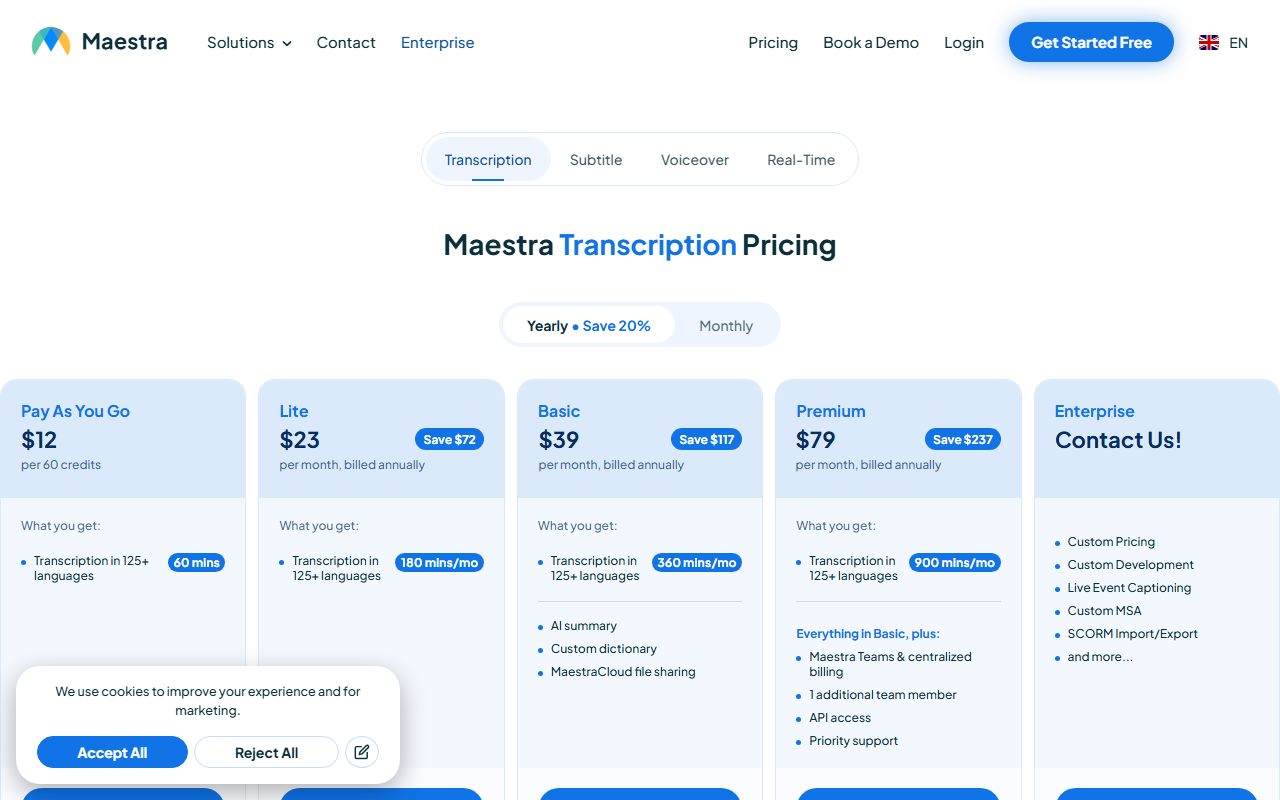
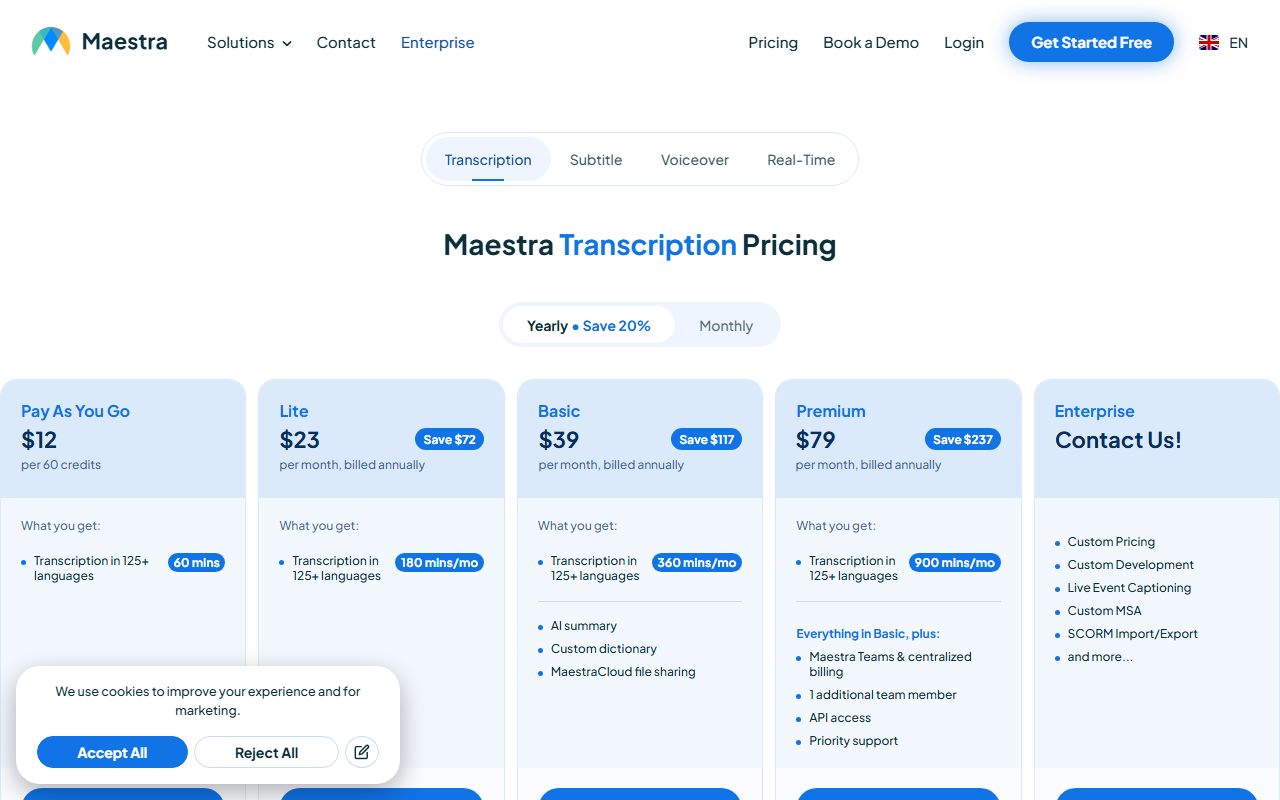
The pricing page carries four tabbed plan tables, and the page source names them: transcription, subtitle, voiceover and real-time.
The plan names repeat across the tabs. So do the prices. The minute allowances do not.
A Premium plan is $79 a month billed annually on all four tabs. On the transcription tab it shows 900 minutes. On the voiceover tab it shows 300.
Nothing on the page explains that these are the same 900 credits spent at different rates. The word credit appears only on the pay as you go card and in one FAQ answer.
The plan card data attributes in the page source settle it. Premium carries 900 credits, Business 1800, Business Plus 4500, Lite 180, Basic 360 and pay as you go 60 for $12.
What a credit buys depends entirely on the job
This table is ours, derived from the published credit counts and the published minute figures. The vendor does not print it anywhere.
Transcription, plain subtitles and real-time captions all run at one credit a minute. Premium's 900 credits show as 900 minutes on all three.
Subtitles into another language run at two credits a minute: 900 credits shows as 450 minutes. Voiceover into another language runs at three, showing 300 minutes.
Real-time translation per language runs at five, showing 180 minutes. Pro voices and voice cloning run at nine, showing 100 minutes.
Real-time dubbing runs at ten: the Business plan's 1800 credits show as 180 minutes, and Business Plus at 4500 shows 450.
So the same credit is worth a full minute of captions or six seconds of live dubbing. Every ratio above checks against two or more plan rows.
Who Maestra is best for
The fit is volume text and stock-voice audio, where the cheap end of the ratio does the work.
- Course and media teams producing translated subtitle tracks at scale, where two credits a minute is the cheapest rate on this shortlist
- Teams that want transcripts, captions and a voiceover track from one budget line rather than three vendors
- Conference and webinar teams that need live captions, where the one credit a minute rate applies
- Buyers who need DeepL translation or a translation glossary, both named on the Business tier
- Teams who already run a meeting recorder such as Otter.ai and need bulk file subtitling as well
- Students, teachers and nonprofits, who the FAQ says get 20 percent off with the first payment partly refunded
Who should skip it
Three groups will find the page costs them more than the product saves.
- Teams whose main job is cloned-voice dubbing, at nine credits a minute plus $2 a minute for lip-sync
- Anyone who needs a signed quote quickly, because two price pairs carry two different savings on the same page
- Buyers who want one ladder to compare, since the tiers on offer change from tab to tab
How the pricing is structured as of November 2026
There are five named subscription tiers, a pay as you go option, and a separate set of live subscriptions.
From the plan card data attributes: Lite is $29 monthly and $23 annually with 180 credits. Basic is $49 and $39 with 360.
Premium is $99 and $79 with 900 credits. Business is $199 and $159 with 1800. Business Plus is $449 and $359 with 4500.
Pay as you go is $12 for 60 credits, which the transcription tab shows as 60 minutes and the subtitle tab as 60 subtitle minutes or 30 translated ones.
The billing toggle is labelled yearly, save 20 percent. The cards print only the annual-equivalent monthly figure plus a dollar saving, never the monthly price itself.
That is why the data attributes matter. Without them a buyer cannot see what they would pay to avoid committing for a year.
The same price pair carries two different savings, twice
This is the finding that holds the value score down, and both halves were read in the page source on November 2, 2026.
The Basic card shows $39 per month billed annually and save $117. The monthly price behind it is $49.
On the same page, the Meetings live subscription shows $49 crossed to $39 per user and save $120. Identical pair, three dollars of difference in the label.
The second instance is larger. Business Plus shows $359 and save $1077. Organizations shows $449 crossed to $359 and save $1,080.
Our reading of why: $117 is exactly 20 percent of $585, which is $48.75 for twelve months, while the card rounds the monthly display up to $49.
The same holds for $237 against $98.75, $477 against $198.75 and $1077 against $448.75. The Lite card breaks the pattern and uses the rounded $29 instead, printing save $72.
So two different methods produce two different savings for the same prices. Take the data attribute pair to checkout, not the saving.
The plan ladder is not the same on every tab
A shortlist reader comparing tiers across vendors should know that this vendor's tiers are not constant across its own page.
The transcription tab offers pay as you go, Lite, Basic, Premium and Enterprise. It stops at $79 and has no Business tier at all.
The subtitle tab offers pay as you go, Basic, Premium, Business and Enterprise. Lite disappears, and the ladder reaches $159.
The voiceover tab offers Basic, Premium, Business, Business Plus and Enterprise. Pay as you go disappears entirely, so there is no way to buy voiceover minutes without a subscription.
The real-time tab offers the same four paid tiers plus Enterprise, and adds the separate live subscriptions above them.
Asked plainly: Lite is a transcription-only plan, and Business Plus is a voice and live-event plan. Neither is a general tier despite sharing one price list.
Live translation is sold again as a separate subscription
The real-time tab carries two different commercial models stacked on top of each other.
Above the credit plans sit four products priced by session rather than by minute. Personal is $19 monthly or $15 annually, with unlimited use and sessions up to 15 minutes.
Meetings is $49 or $39 per user per month, with sessions up to 75 minutes, Zoom, Meet and Teams integration, and two languages per session.
Organizations is $449 or $359, with sessions up to three hours, a room link and QR code, up to 50 simultaneous viewers and three languages.
Events is a one-time purchase from $799 a day, with no session limits, three rooms, up to 100 viewers per room and five languages.
The word unlimited is doing real work there. A session cap replaces a minute cap, which is a cleaner model than the credit plans directly below it.
The character cap and the credit ratio do not agree
One FAQ answer contradicts the voiceover table, and a buyer planning long narration should ask about it.
The answer about voiceover limitations states you can generate up to 3000 characters per minute, or per credit, with the same additional amount for each translation.
It adds that average speech contains 750 characters a minute, so the cap is roughly four times normal speaking density.
But the phrase or per credit treats a credit and a minute as the same thing, while the voiceover table charges three credits for one voiceover minute.
We are printing both readings because the page does not reconcile them. Confirm whether your 900 credits mean 900 minutes of narration or 300 before you commit to a year.
This is the same class of defect we described in our note on credits as a security and metering problem: the unit is defined in two places and the two do not match.
Features, teams and support
The feature ladder is legible even when the pricing is not, and the team seat counts are printed as numbers.
Lite buys transcription in 125 or more languages and nothing else. Basic adds an AI summary, a custom dictionary, file sharing and subtitle import.
Premium adds Maestra Teams with centralised billing, one additional team member, API access, AI rewriting, translation with prompts and priority support.
Business adds two additional team members, DeepL translation, a translation glossary, an embed player and session sharing. Business Plus adds four additional members.
Support is the thin column. Priority support is named from Premium upward and no response target appears anywhere on the page for any tier.
The enterprise page names multi-factor authentication and SAML SSO. No certification, encryption standard or audit report is named on either page we read.
What we could not verify
Five things resisted reading, and listing them is part of the job.
No third-party rating aggregator page would open on November 2, 2026, so no G2, Capterra or Trustpilot score appears in this review.
No refund or cancellation clause for subscriptions appeared on the pricing page. The only refund mentioned is the mechanics of the 20 percent education discount.
No free tier is described on the pricing page, although the site offers a get started free signup. We could not read what that signup includes.
The credit ratios above are our arithmetic from the vendor's own numbers, not a vendor statement. Each one reconciles across at least two plan rows, and none is published as a ratio.
We did not find SOC 2, HIPAA or GDPR claims on the pricing or enterprise pages, which is not the same as their absence from the product.
Alternatives worth reading before you decide
Five live pieces on this site are the useful neighbours here.
- Krisp if the blocker is audio quality before any transcription or dubbing
- Fathom if the recordings are calls and the deliverable is a summary rather than a caption file
- Descript if the transcript is a means to an edited video
- Otter.ai against Fathom for the live meeting end of this market
- Our shortlist of AI meeting note takers when the files are meetings and nothing else
- Our note on headline prices that are really annual before you read any card on any pricing page
Bottom line
Maestra sells the cheapest finished minute on this shortlist and makes you work harder than anyone else to find out what a minute is.
If your output is subtitles or stock-voice voiceover at volume, the derived rates are hard to beat: roughly $0.18 a translated subtitle minute and $0.26 a voiceover minute on Premium annual, by our arithmetic.
If your output is cloned-voice dubbing, nine credits a minute plus $2 a minute of lip-sync puts it at the expensive end of its own page.
Before paying, settle three things: which tier exists on your tab, what your credits are worth for your specific job, and which of the two saving figures applies to your plan.
Buy it if
- Subtitles or stock-voice voiceover are the deliverable in volume, where the derived per-minute rate beats everything else on this shortlist
- You need four jobs from one budget line, since transcription, subtitles, voiceover and live captions all draw from the same credits
- You will do the arithmetic once, because the saving over per-minute dubbing pricing is large enough to pay for the afternoon
- You are a student, teacher or nonprofit, as the FAQ offers 20 percent off with the first payment refunded to the discounted rate
Skip it if
- You need a firm quote this week, because two price pairs on this page carry two different savings each
- Cloned voices are the main job, as nine credits a minute makes this the expensive end of the same page
- You want one plan ladder to compare, since the tiers on offer change depending on which of the four tabs you are reading
Frequently asked
How much does Maestra cost a month?
Monthly list prices read $29 Lite, $49 Basic, $99 Premium, $199 Business and $449 Business Plus in the plan card data attributes, with annual equivalents of $23, $39, $79, $159 and $359, read November 2, 2026.
What does one Maestra credit buy?
It depends on the job. By our arithmetic across the four plan tables, one credit buys a minute of transcription, subtitles or live captions, half a minute of translated subtitles, a third of a minute of voiceover, or a tenth of a minute of live dubbing.
Does Maestra have a free plan?
No free tier appears on the pricing page, read November 2, 2026. The cheapest entry on the page is pay as you go at $12 for 60 credits, which is 60 minutes of transcription or 30 minutes of translated subtitles.
Why do two cards show different savings for the same price?
The $117, $237, $477 and $1077 figures are 20 percent of un-rounded list prices such as $48.75 and $98.75, by our arithmetic, while the displayed monthly price is rounded up. The Lite card and the live subscription cards use the rounded figure instead.
Can Maestra lip-sync a dubbed video?
Yes, at an extra $2 a minute on top of credits, and the unlock is printed on the Business voiceover plan. That is on top of nine credits a minute if you are using a cloned voice, by our arithmetic.
Is Maestra worth it in 2026?
On price per finished minute, yes, by a clear margin on subtitles and stock-voice voiceover. On buying confidence, only if you are willing to confirm your plan, its credit ratio and its saving figure at checkout rather than on the page.
Sources
- Maestra pricing page: four plan tables, plan card data attributes, live subscriptions and FAQ - checked November 2, 2026
- Maestra enterprise page: multi-factor authentication and SAML SSO claims - checked November 2, 2026
- Rask AI pricing page, used for the per-minute comparison in this review - checked November 2, 2026
- Sonix pricing page, used for the per-hour comparison in this review - checked November 2, 2026
Update history
- November 2, 2026 - First publication. All four plan tables, the plan card data attributes carrying both monthly and annual prices and credit counts, the live subscription cards and the FAQ read from the vendor's pricing page on this date using a headless browser DOM dump. The two conflicting saving labels for the $49 and $39 pair and for the $449 and $359 pair were confirmed as literal strings in the page source. The credit per minute ratios are our arithmetic from the published credit counts and minute figures, each reconciled across at least two plan rows. MFA and SAML SSO claims read from the enterprise page the same day. No third-party rating is quoted because no aggregator page could be opened.
Visit Maestra
We have no affiliate relationship with this vendor. Link goes to the official site.