 Talk AI Tools

Beautiful.ai
Design guardrails that keep a deck on brand, sold at a team price the vendor's own pricing page states two different ways
Scored on the published rubric, from documentation, pricing and verified user reports.
Best for: A small marketing or sales team that ships client-facing decks weekly and wants brand rules enforced by the editor rather than by a reviewer.
Verdict
Beautiful.ai sells design enforcement, and it is the only tool in this cluster whose published feature list is built around stopping an off-brand slide rather than generating more slides.
This is a documentation review, built from the vendor's pricing page, teams page, security page and the FAQ on the pricing page, all read on November 1, 2026. No account was opened and no first-hand claims are made below.
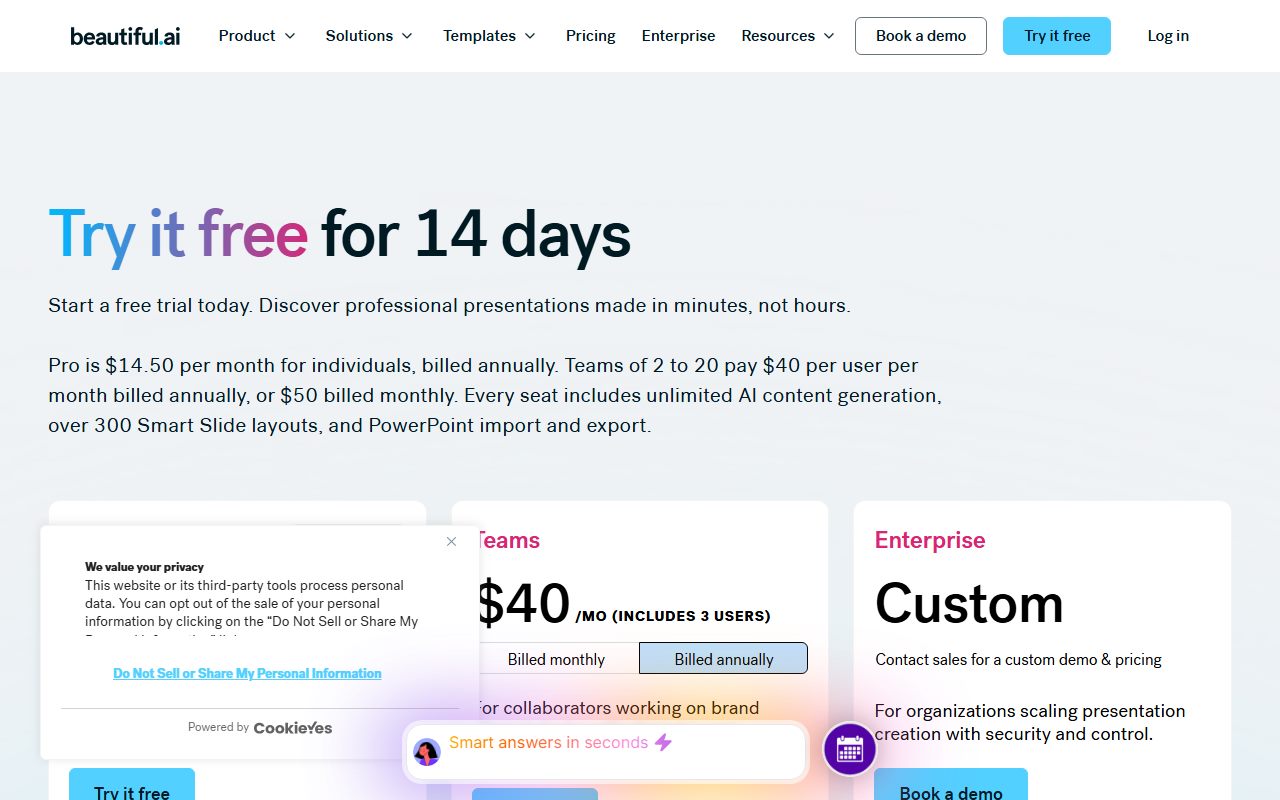
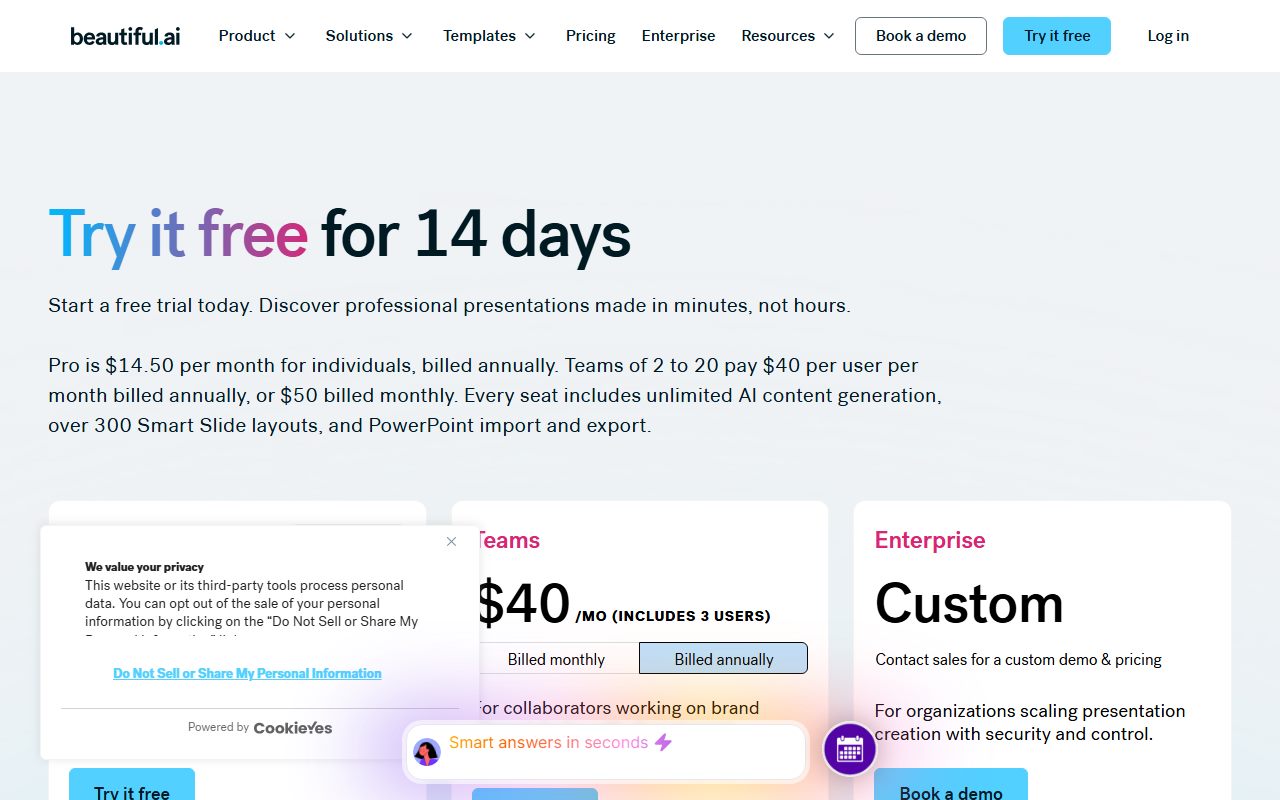
The headline problem is the Team price. The plan card reads $40 a month including 3 users. The intro paragraph above it, and two separate FAQ answers below it, read $40 per user per month. For a three-person team that is $40 or $120, on one page, on one day.
The second problem is quieter. On the published comparison table, the Pro plan at $14.50 a month has a tick against the self-serve knowledge base and no tick against email support.
What earns the score back is the workspace layer. Locked themes, version control, a centralised slide library and engagement analytics are all on the Team list, and the vendor's security page is unusually specific about model training.
Visit Beautiful.ai
We have no affiliate relationship with this vendor. Link goes to the official site.
Where it is strong
- The published comparison table is honest about tiering: Pro gets no workspace rows at all, and the five workspace caps on Team are printed as numbers rather than described in prose
- The security page states that sub-processors are barred from using customer data for training, and that data processed by its AI models will not be used to train public LLM models
- Pro at $14.50 a month billed annually already includes unlimited AI content generation, AI image generation, AI translation and over 300 Smart Slide layouts
- A single month of Pro can be bought outright for $45 for one-off projects, which is rare in a category that sells annual commitments
- The teams page publishes flat company-wide rates: $6,000 a year for up to 50 employees and $12,000 a year for up to 100, both with full access for every user
- PowerPoint import and editable PowerPoint export are ticked on all three tiers, so a deck can leave the tool in a format a client can open
Where it falls short
- The Team price appears as $40 including 3 users on the plan card and as $40 per user per month in the page intro and in two FAQ answers, a threefold spread for a three-person team
- There is no free plan. The only entry is a 14-day trial of Pro or Team, and the vendor states a credit card is required and will be charged in full if the trial is not cancelled
- On the comparison table the Pro tier is ticked for the self-serve knowledge base only; email support and priority support are ticked from Team upward
- Annual subscriptions are described as eligible for only a partial refund if requested within 24 hours of purchase or renewal, and monthly subscriptions are stated to be non-refundable
- The flat SMB rates are not self-serve: the teams page routes them through a scheduled demo, so the cheapest route for a 20-person team cannot be bought from the pricing page
- Brand guardrails, SAML SSO, SCIM provisioning, audit events and advanced permissions are all ticked for Enterprise only, which is quoted on request
At a glance
| Starting price | $14.50 per month billed annually on Pro for one member; no free plan listed (pricing page, November 1, 2026) |
|---|---|
| Pricing note | Pro is listed at $14.50 per month billed annually for one member. The Team card reads $40 per month including 3 users, while the intro paragraph and two FAQ answers on the same page read $40 per user per month billed annually and $50 billed monthly. A one-off month of Pro is listed at $45 (pricing page, checked November 1, 2026) |
| Free plan | No. The only entry is a 14-day free trial of Pro or Team, and the vendor states a credit card is required |
| Members per tier | Pro 1, Team 2 to 20, Enterprise unlimited, per the comparison table on the pricing page |
| Workspace caps on Team | 5 workspace themes, 10 workspace presentation templates, 50 slide library items, 100 asset library items; all blank on Pro and unlimited on Enterprise |
| One-off option | $45 for a month of everything in Pro, billed monthly, described on the page as for ad hoc projects |
| Flat company rates | $6,000 a year for up to 50 employees, $12,000 a year for up to 100, full access for all users, arranged through a demo (teams page) |
| Refunds | Annual plans partial refund only if requested within 24 hours of purchase or renewal; monthly plans non-refundable; all refunds subject to a processing fee |
| Security and training | SOC 2 Type II, GDPR, CCPA and PCI claimed; AES-256 at rest, HTTPS 1.2 and 1.3 in transit; sub-processors barred from training on customer data (security page) |
| Student offer | A year free for students with a valid .edu email, per the pricing FAQ |
What Beautiful.ai actually is
Beautiful.ai is a browser presentation editor whose selling point is refusing to let you break the layout.
The core unit is the Smart Slide. The vendor lists over 300 of them and describes them as templates that adapt to your content as you work, with auto-formatting applied rather than offered.
A Classic Slide exists as the escape hatch. The pricing page describes it as a blank slide for when you want creative freedom outside the design guardrails.
The AI layer sits on top of that structure rather than beside it. Unlimited AI content generation, AI image generation, an AI writing assistant and AI language translation are all listed on the entry Pro card.
The company behind it is Beautiful Slides, Inc., per the copyright line in the page footer read on November 1, 2026.
Who Beautiful.ai is best for
The fit is a team whose decks are seen by customers and whose brand rules keep being ignored.
- A marketing team that wants fonts, colours and logos locked rather than circulated in a style guide nobody opens
- A sales team that needs a centralised slide library so the same pricing slide is not rebuilt five times
- A consultancy that ships client decks weekly and bills by the hour, where formatting time is the real cost
- An operator with one important deck to build, who can buy a single month of Pro for $45 and stop
- A 20 to 50 person company willing to sit through a demo, because the flat SMB rate changes the arithmetic
- Anyone who must hand over an editable PowerPoint file, which is ticked on all three tiers
Who should skip it
Three groups will stall before the first slide.
- Anyone who needs a firm quote for three people, because the page prints two prices for that team
- Anyone who wants to evaluate without a card, since there is no free tier at all
- Anyone whose workflow is already Google Slides or PowerPoint, where an add-in avoids migrating the deck
The Team price is printed two ways on the same page
This is the finding that moves the value score, so we print both readings rather than picking one.
The Team plan card shows $50 struck against $40, with the unit written as per month including 3 users and a billing toggle for monthly or annual.
Directly above the cards, a paragraph reads that teams of 2 to 20 pay $40 per user per month billed annually, or $50 billed monthly.
Two FAQ answers lower down repeat the per-user reading. One of them states the Team plan covers 2 to 20 seats at $40 per user per month billed annually.
For three people that is $40 a month on one reading and $120 a month on the other. Both were on screen on November 1, 2026.
The card's own bullet list leans toward the cheaper reading: it includes the line fixed pricing for up to three users. We still cannot resolve it from the page, and neither can a buyer.
This is the same failure mode we wrote up in the note on Grammarly's headline price. The number on the card and the number on the invoice are different documents.
How the pricing is structured as of November 2026
There are three self-serve tiers, one one-off option and a demo-only SMB route. All figures below come from the vendor's own pages, read November 1, 2026.
Pro is listed at $14.50 a month billed annually, for one member. Team is the contested figure above, for 2 to 20 members. Enterprise reads Custom with a contact sales button.
A fourth box sits under the cards. It offers everything in the Pro plan, billed monthly, at $45, described as being for ad hoc projects.
The teams page adds the part the pricing page does not. An SMB 50 plan is listed at $6,000 a year flat for up to 50 employees, and SMB 100 at $12,000 a year for up to 100, both with full access for all users.
By our arithmetic, $6,000 a year is $500 a month. On the per-user reading of Team, that is cheaper than 13 seats. The catch is that the SMB route starts with a scheduled demo, not a card.
Features: the workspace caps are the real tier line
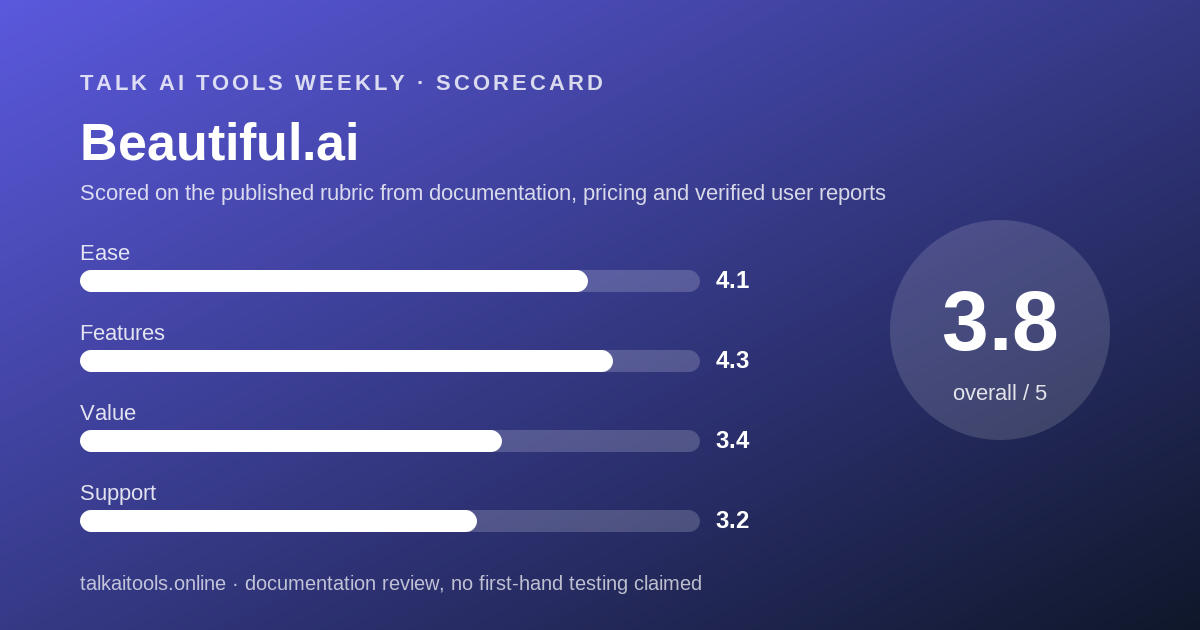
Features score 4.3 of 5, and the published comparison table is the reason.
Most design rows are ticked on all three tiers. Unlimited AI content generation, Smart Slides, slide animations, the stock media library, audio narration, version history, custom branding, PowerPoint import, PDF export and editable PowerPoint export all appear everywhere.
The tier line is the workspace. Shared folders begin at Team. The caps are printed as plain numbers: 5 workspace themes, 10 workspace presentation templates, 50 slide library items and 100 asset library items, all unlimited on Enterprise.
Those four rows are blank on Pro. An individual plan has no workspace at all, which is a clearer statement of what you are buying than most pricing pages manage.
The governance rows are Enterprise only: brand guardrails, plus separate permissions rows for classic slides, the media library, brand and the library.
Team is where the collaboration list lands - real-time editing, version control and locked slides, a centralised slide and template library, shared assets, live data linking to charts, and viewer and slide analytics.
If what you need is writing rather than layout, our Jasper review and Frase review cover that end, and the shortlist of AI SEO content tools applies the same rubric.
Ease of use: what the 4.1 is built from
Ease scores 4.1 of 5, graded on how fast a buyer can self-serve an answer and how clearly the limits are published.
The product promise helps. Auto-formatting layouts remove the decisions that make slide work slow, and the vendor states the design guardrails can be switched off per slide.
The comparison table is a genuine strength. Four sections, a per-tier column each, and numeric caps where a cap exists rather than the word limited.
The deduction is the price itself. A page that answers a three-person quote with two different numbers has failed the one question most buyers arrive with.
The second deduction is the SMB route. The cheapest plan for a company of 30 is not on the pricing page and cannot be bought without a conversation.
Support: Pro buys the knowledge base and nothing else
Support scores 3.2 of 5, the weakest column, and it is read straight off the vendor's own table.
The support section has four rows. Self-serve knowledge base is ticked on all three tiers. Email support and priority support are ticked on Team and Enterprise. Onboarding and training is Enterprise only.
On the published table, the Pro tier at $14.50 a month therefore has no email support ticked. We report that as the page renders it.
No response-time target appears for any tier. Priority support is a label on this page, not a number of hours.
We did not open a ticket and will not estimate reply times. The score reflects a thin published commitment at the entry price.
Value: the one-off $45 is the honest entry point
Value scores 3.4 of 5, graded on what the published price buys at one, three and twenty users.
At one user, $14.50 a month annually is reasonable for unlimited AI generation and 300-plus layouts, but it comes with no workspace and, per the table, no email support.
At three users the score suffers for a reason that is not about the product. We cannot tell a reader what it costs.
At twenty users the per-user reading gives $800 a month, or $9,600 a year by our arithmetic. The flat SMB 50 rate of $6,000 a year covers up to 50 employees. If both are current, the self-serve path is the expensive one.
The refund terms cost it further. An annual plan is described as eligible for a partial refund only inside 24 hours of purchase or renewal, and monthly plans are stated to be non-refundable.
The $45 single month is the one clean offer on the page. It is the only way to find out what the tool does without agreeing to a year.
Tools that bill by seat type rather than headcount have the same forecasting problem from the other direction, which we covered in the note on Claude Team seat tiers.
What the vendor publishes on security and model training
This is the strongest documentation in the cluster, and it is specific enough to quote.
The security page states the company holds SOC 2 Type II, GDPR, CCPA and PCI certifications, supports SAML SSO 2.0 and SCIM provisioning, and runs annual SOC 2 certification and web application penetration tests.
On encryption it names AES-256 at rest and HTTPS 1.3 and 1.2 in transit.
On model training it is unusually direct. Data processed by its AI models will not be used to train public LLM models, the generative features run on business-tier APIs from several AI platforms, and sub-processors are barred from using customer data for training.
It also states that customers will be notified of changes in how data is processed, stored or transmitted, and that this is validated during the annual SOC 2 assessment.
We did not inspect the certificates or the sub-processor list; the page states both are available. The admin controls that enforce any of this - SSO, SCIM, audit events - are ticked for Enterprise only.
What we could not verify
Three things stayed out of reach on November 1, 2026, and we would rather name them than fill the gaps.
No third-party rating appears in this review. The aggregator pages we tried could not be opened, so no score from them is quoted.
The teams page carries a savings calculator that claims professionals reclaim 5.6 hours a week, worth roughly $20,000 of annual productivity per person. That is the vendor's own modelling, with no method published, and we treat it as marketing rather than evidence.
The Enterprise price is not published, so the top of the range cannot be compared with anything.
Alternatives worth reading before you decide
Three alternatives cover most reasons a reader would reject this tool. Figures come from each vendor's own pricing page, read November 1, 2026.
Choose Plus AI if you do not want to move the deck. It runs inside Google Slides and PowerPoint, and is listed at $10 per user a month on Basic billed annually, rising to $30 on Team.
Choose Decktopus if the annual price is the whole question. Pro is listed at $9.99 a month billed $119.88 a year, with 750 AI credits a month, though the page states all purchases are final and non-refundable.
Choose a video-first tool if the output is a recording rather than a deck, in which case our Descript review is the better starting point.
Otherwise choose Beautiful.ai if brand enforcement is the job and you can get a straight answer on the Team price before you pay.
Bottom line
Beautiful.ai earns 3.8 of 5 on our four-column rubric. The product scores well and the pricing page drags it down.
It is the right pick when off-brand slides cost you real money, and when somebody needs to lock themes, library and permissions rather than ask nicely.
It is the wrong pick when you need a firm number for a small team today, because the page will give you two.
Before buying, do two things. Ask sales in writing whether Team is $40 for three users or $40 each, and get the answer in the email trail.
Then, if your company has more than about 15 people, ask about the SMB flat rates before taking a per-seat quote.
Every figure above was read on the vendor's own pages on November 1, 2026. For the publishing side of the same workflow, our Buffer review and Metricool review apply this rubric to schedulers.
Buy it if
- Off-brand slides are your actual problem, because locked themes, brand permissions and version control are what this tool sells
- You have a single ad hoc deck to build, since $45 buys one month of Pro outright with no annual commitment
- Your company has 20 to 50 employees, because the flat $6,000 a year SMB rate undercuts the per-seat Team maths by our arithmetic
- Decks have to leave in PowerPoint format, which is ticked on every tier rather than reserved for the top one
Skip it if
- You need a firm three-person quote before signing, because the page prints $40 and $120 for that team on the same screen
- You want to try before paying anything, since there is no free plan and the trial takes a card
- Email support matters at the entry price, as the comparison table ticks it from Team upward only
- You already live inside Google Slides or PowerPoint, where an add-in avoids moving the deck at all
Frequently asked
Does Beautiful.ai have a free plan?
No. The pricing page, checked November 1, 2026, lists Pro, Team and Enterprise with no $0 tier. The only free entry is a 14-day trial of Pro or Team, and the FAQ states a card is required and will be charged in full if you do not cancel.
How much does Beautiful.ai cost for a team of three?
The page gives two answers. The Team card reads $40 a month including 3 users. The intro paragraph and two FAQ answers read $40 per user per month billed annually. That is $40 or $120 a month for the same team. Confirm the figure at checkout.
What does the $45 option include?
The pricing page lists a monthly option described as everything in the Pro plan, billed monthly, at $45 for ad hoc projects. It is the only route on the page that does not ask for an annual commitment or a demo.
Is there a cheaper plan for a 30-person company?
The teams page publishes an SMB 50 plan at $6,000 a year flat for up to 50 employees with full access for all users. By our arithmetic that is $500 a month, well below 30 seats at the per-user reading of Team. It is arranged through a demo, not self-serve.
Does Beautiful.ai train AI models on my decks?
The security page, read November 1, 2026, states that data processed by its AI models will not be used to train public LLM models, that its generative features run on business-tier APIs from top AI platforms, and that sub-processors are barred from using customer data for training.
What is Beautiful.ai's refund policy?
The pricing FAQ states annual subscriptions may be eligible for a partial refund only if requested within 24 hours of the initial purchase or renewal, that monthly subscriptions are non-refundable, and that all refunds are subject to a processing fee.
Which Beautiful.ai features are Enterprise only?
On the comparison table, brand guardrails, SAML SSO, audit events, SCIM user provisioning, advanced permissions, onboarding and training, and the four permissions rows for classic slides, media library, brand and library are ticked for Enterprise only. Enterprise pricing is quoted on request.
Sources
- Beautiful.ai pricing page, plan cards, comparison table and FAQ - checked November 1, 2026
- Beautiful.ai teams page, including the SMB 50 and SMB 100 flat rates - checked November 1, 2026
- Beautiful.ai security page, certifications and model training statements - checked November 1, 2026
- Plus AI pricing page (used in the alternatives section) - checked November 1, 2026
- Decktopus pricing page (used in the alternatives section) - checked November 1, 2026
Update history
- November 1, 2026 - First publication. Plan cards, the contested Team price, the $45 one-off, the four-section comparison table and the refund and trial terms read from the vendor's pricing page on this date. The SMB 50 and SMB 100 flat rates read from the teams page, and the certification, encryption and model training statements from the security page, the same day. No third-party rating is quoted because no aggregator page could be opened.
Visit Beautiful.ai
We have no affiliate relationship with this vendor. Link goes to the official site.